

App that helps people delay Caffeine Intake
App that helps people delay Caffeine Intake
overview
overview
This is a recent project I worked on in my Masters program. Our professors gave us precise problem statements for our projects. We were to design an app based on these statements, using the 'Hook Model,' which revolves around the cycle of Trigger, Action, Reward, and Investment.
About
About
Duration: Jan '24 - May '24
Role: Graduate student
Course: Digital Experience Design
Professors: Mike Begley, Ben Swofford, Chris Hartzell
Software: Figma
Duration: Jan '24 - May '24
Role: Graduate student
Course: Digital Experience Design
Professors: Mike Begley, Ben Swofford, Chris Hartzell
Software: Figma
Individually designed & managed project
Individually designed & managed project
Problem Statement
Problem Statement
"Delaying caffeine intake for 90 minutes after you wake up"
"Delaying caffeine intake for 90 minutes after you wake up"
"Sip Delay" is an app designed to assist users in postponing their caffeine intake daily. It achieves this by immersing users in a virtual coffee garden experience, where they nurture a coffee plant each day. Through this engagement, users delay their coffee consumption and earn rewards as they progress through the experience.”
"Sip Delay" is an app designed to assist users in postponing their caffeine intake daily. It achieves this by immersing users in a virtual coffee garden experience, where they nurture a coffee plant each day. Through this engagement, users delay their coffee consumption and earn rewards as they progress through the experience.”

The final design
The final design
The video showcases the overall navigation through the app:
The video showcases the overall navigation through the app:
Initial Navigation: The user starts at the landing screen and proceeds to the login or signup page.
Initial Navigation: The user starts at the landing screen and proceeds to the login or signup page.
Morning Routine: After turning off the morning alarm, the logged-in user lands on the homepage and is prompted to plant a coffee bean.
Morning Routine: After turning off the morning alarm, the logged-in user lands on the homepage and is prompted to plant a coffee bean.
Planting and Timer: Upon planting the bean, a 90-minute timer begins. The plant grows through various stages, and after 90 minutes, the user can save the plant, maintaining their coffee delay streak.
Planting and Timer: Upon planting the bean, a 90-minute timer begins. The plant grows through various stages, and after 90 minutes, the user can save the plant, maintaining their coffee delay streak.
Photo Verification: The user can upload a live photo of their coffee to verify the delay, earning bonus points.
Photo Verification: The user can upload a live photo of their coffee to verify the delay, earning bonus points.
Daily Rewards: Each day the user saves a plant, they win variable special items for their coffee garden, such as pots, umbrellas, and fountains. These items have different point values that contribute to the user's total points, helping them progress on the leaderboard.
Daily Rewards: Each day the user saves a plant, they win variable special items for their coffee garden, such as pots, umbrellas, and fountains. These items have different point values that contribute to the user's total points, helping them progress on the leaderboard.
Profile and Settings: Users can manage their profile and app settings on the profile page.
Profile and Settings: Users can manage their profile and app settings on the profile page.
Notifications: The Notifications page displays useful reminders and informs the user of new weekly rewards, available streak challenges, and interactions with their posts.
Notifications: The Notifications page displays useful reminders and informs the user of new weekly rewards, available streak challenges, and interactions with their posts.
Sharing and Challenges: Users can share their coffee delay streak and accept streak challenges.
Sharing and Challenges: Users can share their coffee delay streak and accept streak challenges.
Next Day: The user waits until the next morning to plant the coffee bean again.
Next Day: The user waits until the next morning to plant the coffee bean again.
Why is Delaying Caffeine intake After waking up important?
Why is Delaying Caffeine intake After waking up important?
Delaying caffeine intake for 90 minutes after waking up offers several benefits:
Supports natural cortisol and adenosine rhythms, enhancing sleep and energy.
Reduces the risk of sleep disruption and promotes better rest.
Provides more sustained energy throughout the day.
Encourages reliance on natural wakefulness mechanisms.
Maximizes cognitive benefits for better focus.
Minimizes anxiety by avoiding caffeine when cortisol is high.
Leads to a healthier, more balanced caffeine intake and overall well-being.
App concept
App concept
Here’s how the app works:
Morning Alarm:
You wake up to the gentle sound of the app's alarm. As you turn it off, you're seamlessly taken to the app's homescreen.Planting a Coffee Bean:
Here, you’re invited to plant a virtual coffee bean. With a simple tap, you plant the bean, and a 90-minute timer begins.Growth Journey:
As the timer counts down, your virtual coffee plant embarks on a beautiful growth journey, progressing through various stages. You can watch it sprout, grow leaves, and finally become ready for harvest at the end of the 90 minutes.Harvest and Rewards:
Once the time is up, you harvest your fully grown coffee plant. For your patience, you receive a daily reward in the form of unique virtual objects for your coffee garden. Each object has a different point value, helping you climb up the leaderboard as your collection grows.Weekly Rewards:
In addition to daily rewards, you earn weekly rewards in the form of discount coupons to nearby coffee shops, making your delayed gratification even more worthwhile.Community and Challenges:
Share your streaks with the app’s community, post and accept streak challenges, and motivate others to join you in this healthier habit.Navigation:
The app’s main navigation bar includes tabs for the homepage, streaks, coffee garden, notifications, and profile, making it easy to explore all its features.
By turning your morning coffee into a rewarding and engaging experience, this app not only helps you delay your caffeine intake but also fosters a sense of community and achievement.
Here’s how the app works:
Morning Alarm:
You wake up to the gentle sound of the app's alarm. As you turn it off, you're seamlessly taken to the app's homescreen.Planting a Coffee Bean:
Here, you’re invited to plant a virtual coffee bean. With a simple tap, you plant the bean, and a 90-minute timer begins.Growth Journey:
As the timer counts down, your virtual coffee plant embarks on a beautiful growth journey, progressing through various stages. You can watch it sprout, grow leaves, and finally become ready for harvest at the end of the 90 minutes.Harvest and Rewards:
Once the time is up, you harvest your fully grown coffee plant. For your patience, you receive a daily reward in the form of unique virtual objects for your coffee garden. Each object has a different point value, helping you climb up the leaderboard as your collection grows.Weekly Rewards:
In addition to daily rewards, you earn weekly rewards in the form of discount coupons to nearby coffee shops, making your delayed gratification even more worthwhile.Community and Challenges:
Share your streaks with the app’s community, post and accept streak challenges, and motivate others to join you in this healthier habit.Navigation:
The app’s main navigation bar includes tabs for the homepage, streaks, coffee garden, notifications, and profile, making it easy to explore all its features.
By turning your morning coffee into a rewarding and engaging experience, this app not only helps you delay your caffeine intake but also fosters a sense of community and achievement.
Hook model
Hook model
Based on Nir Eyal’s book ‘How to build Habit forming products’, the Hook Model was followed in designing the app.
Based on Nir Eyal’s book ‘How to build Habit forming products’, the Hook Model was followed in designing the app.
Trigger
The user receives triggers in form of alarm clock every morning. The notifications of streak challenges, weekly rewards, etc. are other triggers
The user receives triggers in form of alarm clock every morning. The notifications of streak challenges, weekly rewards, etc. are other triggers
Action
After waking up, the user performs the activity of growing a coffee plant, for 90 minutes and saving it to gain daily rewards
After waking up, the user performs the activity of growing a coffee plant, for 90 minutes and saving it to gain daily rewards
Reward
The user receives daily rewards in the form of garden items, each with point values that add to the user's score. As points increase, the user's levels advance. Maintaining a week's streak earns the user a weekly reward, including a discount coupon.
The user receives daily rewards in the form of garden items, each with point values that add to the user's score. As points increase, the user's levels advance. Maintaining a week's streak earns the user a weekly reward, including a discount coupon.
Investment
Invest-ment
The user can shares personal streak with the community. The user can post a streak challenge or the user can accept a challenge from another user
The user can shares personal streak with the community. The user can post a streak challenge or the user can accept a challenge from another user

Design Process
Design Process
After coming up with the concept of virtual coffee garden following the Hook Model, I proceeded with the design process following Strategy, Scoping, Structure, Skeleton and Surface. The book 'Think like a UX Researcher', by David Travis and Philip Hodgson was followed in designing the whole app.
After coming up with the concept of virtual coffee garden following the Hook Model, I proceeded with the design process following Strategy, Scoping, Structure, Skeleton and Surface. The book 'Think like a UX Researcher', by David Travis and Philip Hodgson was followed in designing the whole app.
Phase 1:
User storyboards
Kano Cards
MOSCOW Model
User Flow
Low-fidelity Hand-drawn Wireframes
Mood Board
High-fidelity Digital Wireframes
Style Guide
Digital Prototype
Phase 1:
User storyboards
Kano Cards
MOSCOW Model
User Flow
Low-fidelity Hand-drawn Wireframes
Mood Board
High-fidelity Digital Wireframes
Style Guide
Digital Prototype
Phase 2:
Usability Testing Participants Screener Surveys
Usability Testing of Participants
Creating Testing Canvases
Synthesizing the Findings
Implementing Design Changes
Final Digital Prototype
Phase 2:
Usability Testing Participants Screener Surveys
Usability Testing of Participants
Creating Testing Canvases
Synthesizing the Findings
Implementing Design Changes
Final Digital Prototype
Storyboard
Storyboard
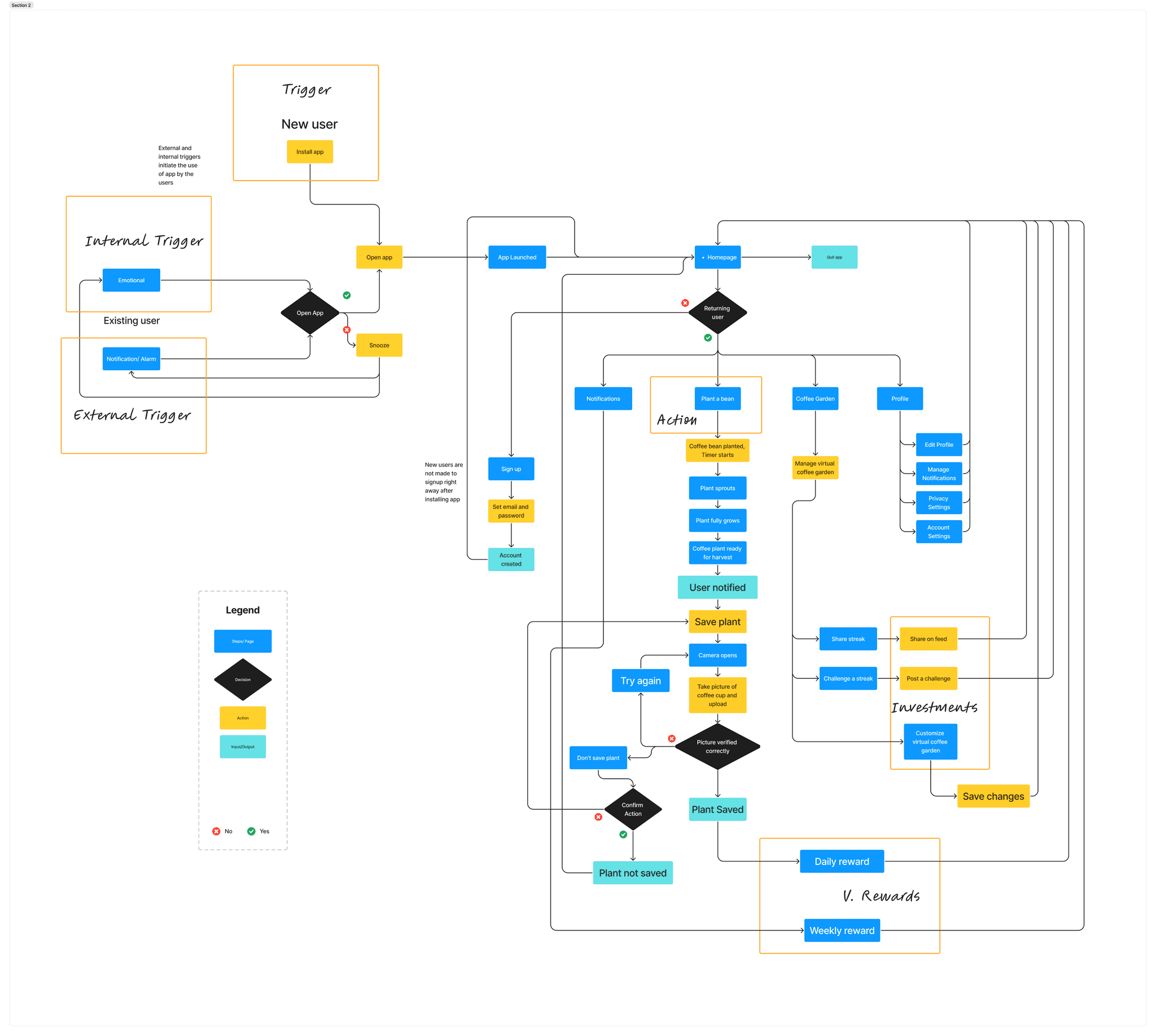
I made series of sketches to outline the user interface and interactions of the app, depicting the flow and functionality of key features to help visualize and plan the user experience.
I made series of sketches to outline the user interface and interactions of the app, depicting the flow and functionality of key features to help visualize and plan the user experience.
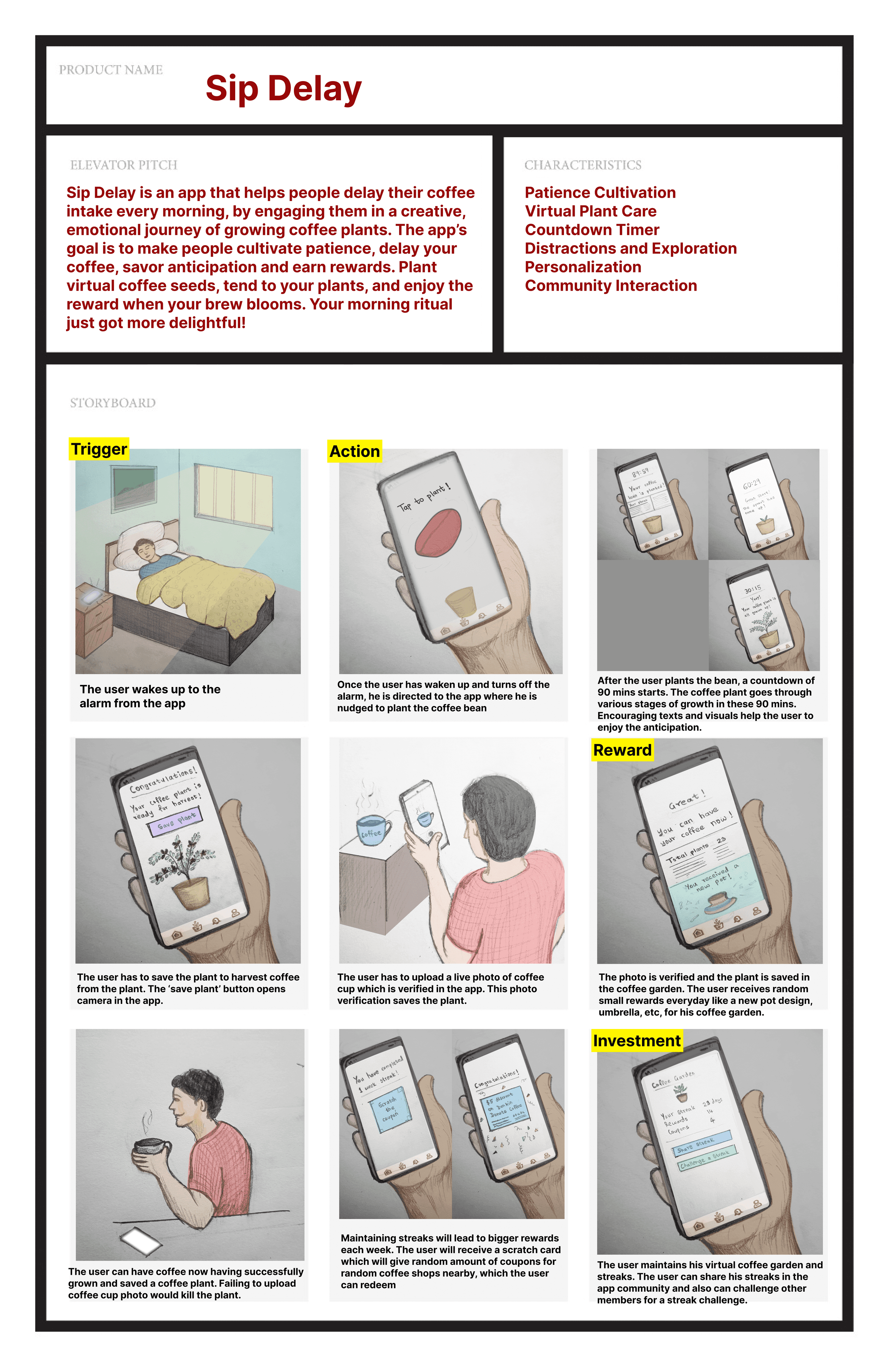
MOSCOW model using Kano cards
MOSCOW model using Kano cards
I used this prioritization framework used to categorize features and requirements into four groups: Must have (essential for launch), Should have (important but not critical), Could have (nice to include if possible), and Won't have (not a priority for the current release).
I used this prioritization framework used to categorize features and requirements into four groups: Must have (essential for launch), Should have (important but not critical), Could have (nice to include if possible), and Won't have (not a priority for the current release).
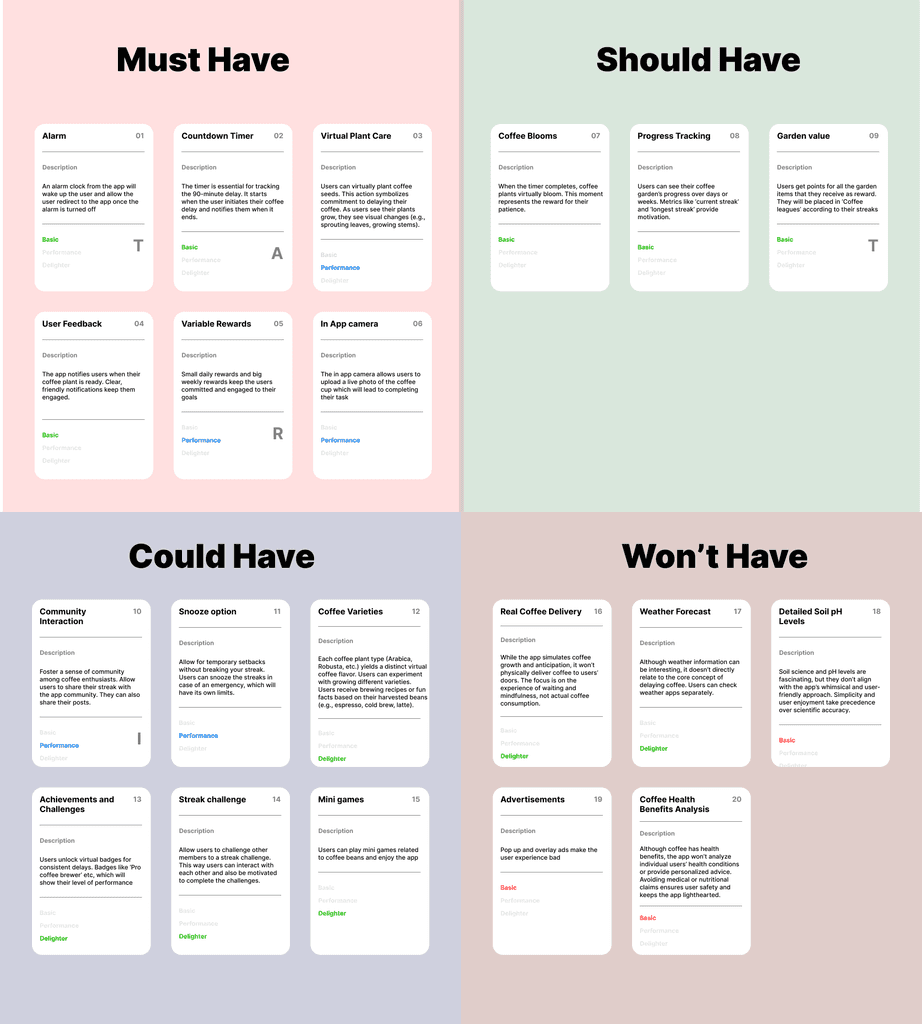
User Flow
I created this diagram that maps out the steps a user takes to complete a task within the app, highlighting the various screens, actions, and decisions points, helping to ensure a smooth and intuitive user experience following the Hook model.
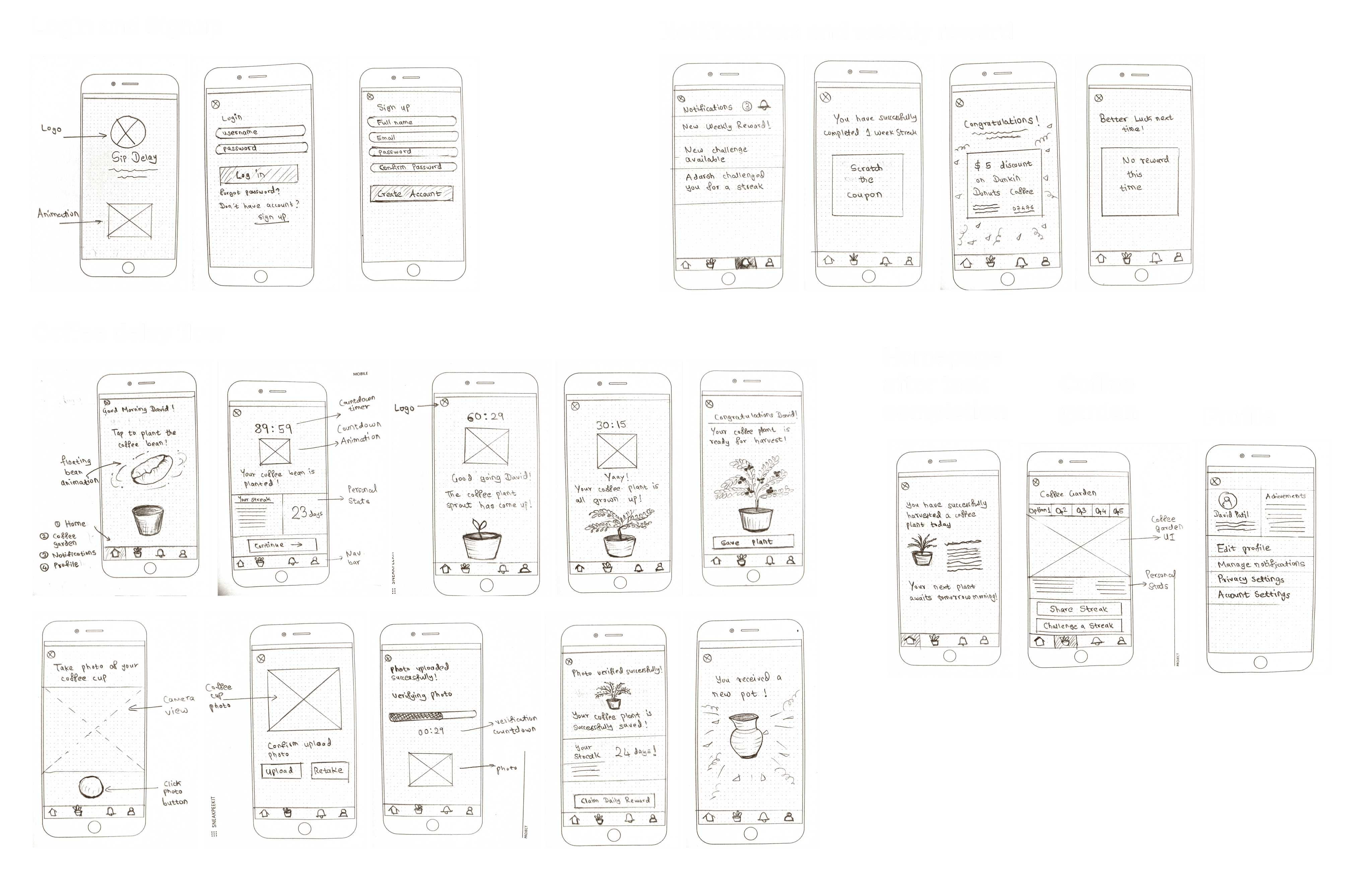
Hand-drawn wireframes
Hand-drawn wireframes
Created simple sketches on paper that outline the basic structure and layout of an app's user interface.
Created simple sketches on paper that outline the basic structure and layout of an app's user interface.
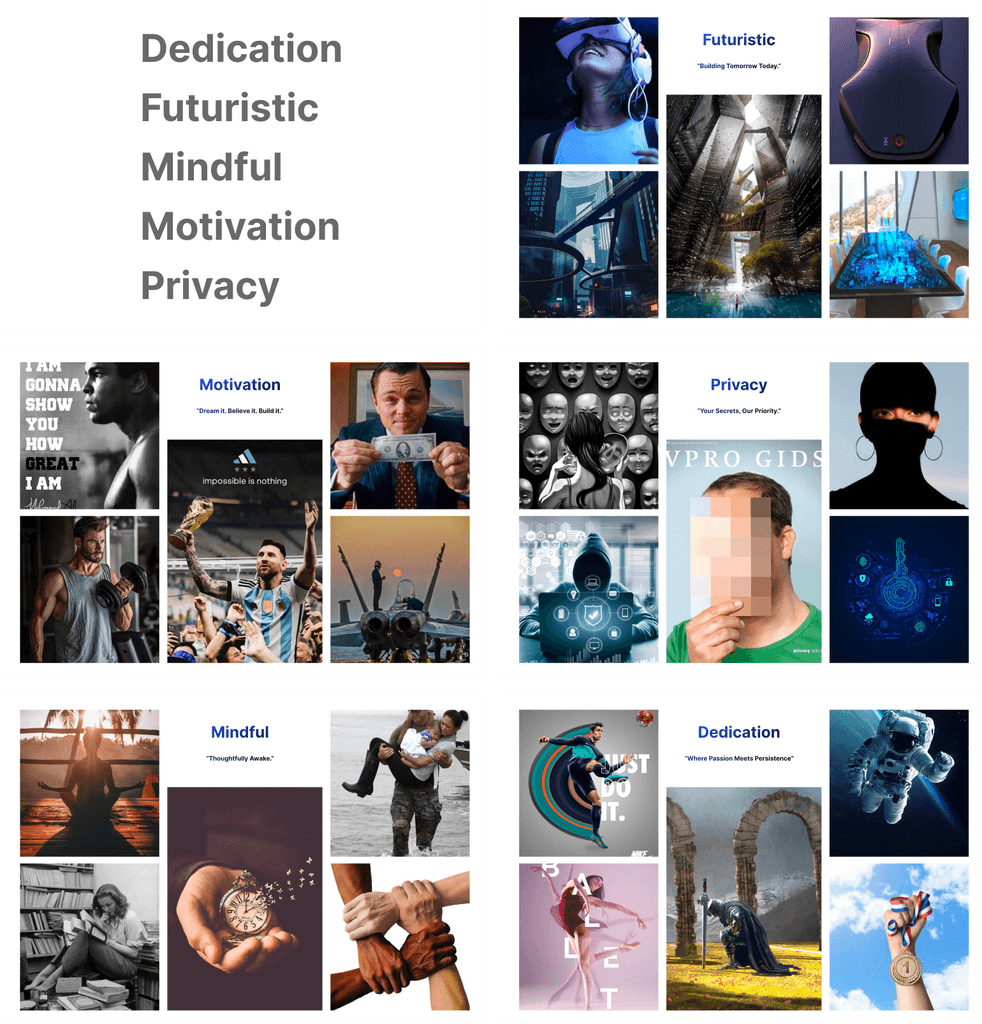
Moodboard
Moodboard
A created this mood-board based on the key words that relate to the app, to convey a specific style or feeling for a project.
A created this mood-board based on the key words that relate to the app, to convey a specific style or feeling for a project.
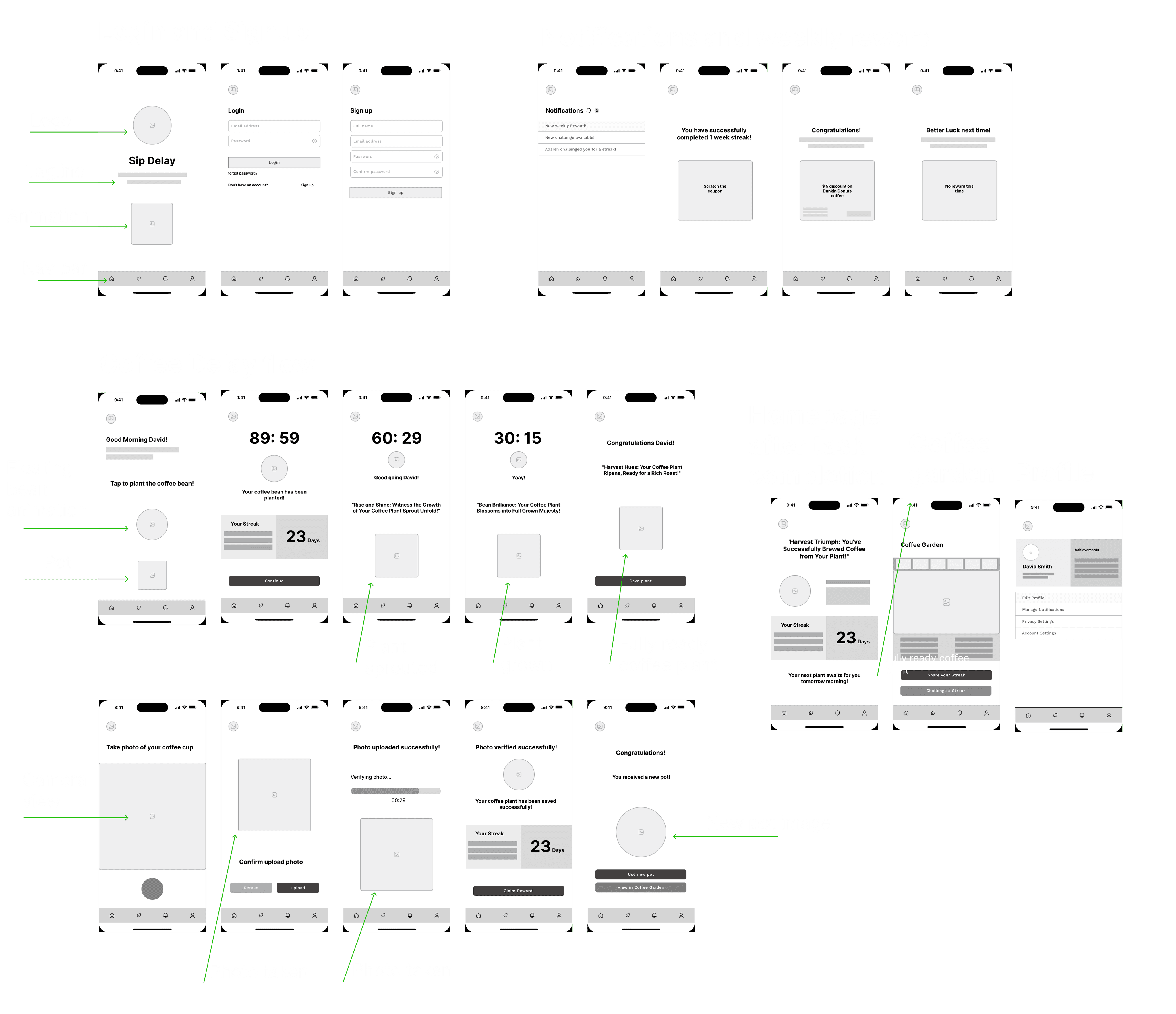
digital wireframes
digital wireframes
Created basic, low-fidelity representations of an app's layout created using digital tools such as Figma in this case.
Created basic, low-fidelity representations of an app's layout created using digital tools such as Figma in this case.
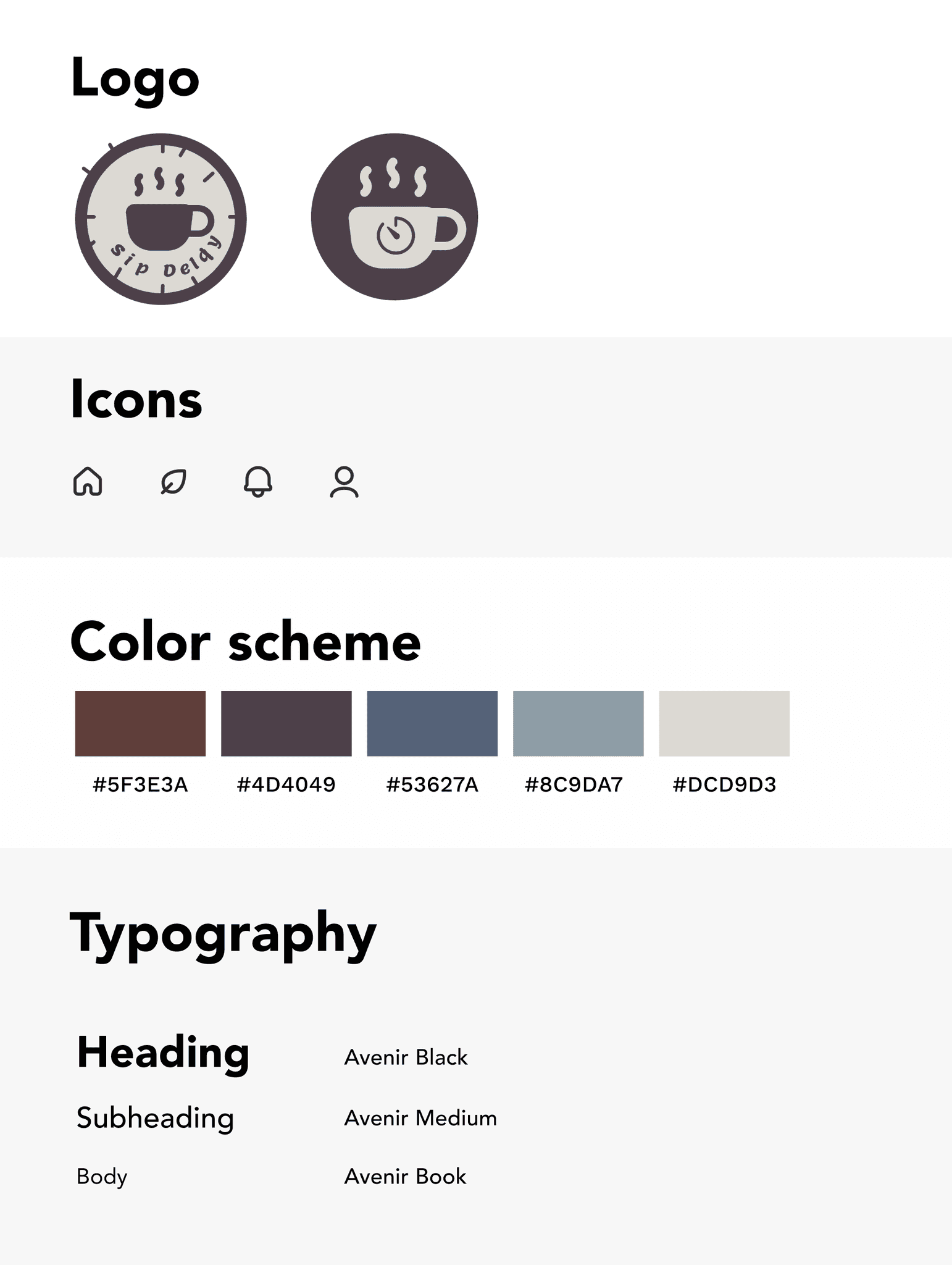
Style guide
Style guide
Came up with a style guide detailing the visual and branding elements of an app, including typography, colors, icons, etc, to ensure design consistency.
Came up with a style guide detailing the visual and branding elements of an app, including typography, colors, icons, etc, to ensure design consistency.
UI Design
UI Design
The high-fidelity digital prototypes were designed with a focus on clarity, consistency, alignment, and visual hierarchy. This ensured they were easy to understand, uniformly styled, well-organized, and visually structured to highlight key information effectively.
The high-fidelity digital prototypes were designed with a focus on clarity, consistency, alignment, and visual hierarchy. This ensured they were easy to understand, uniformly styled, well-organized, and visually structured to highlight key information effectively.
Initial Design
Login and Signup Flow:
Login and Signup Flow:
Quick login/signup process
Directs users to the homepage
Quick login/signup process
Directs users to the homepage
Homepage and Streaks Data:
Homepage and Streaks Data:
Displays streak data to motivate users
Displays streak data to motivate users
Receiving Daily Rewards:
Receiving Daily Rewards:
Plant a coffee bean and harvest plant after 90 minutes
Receive a daily reward, like a decorative pot for the virtual coffee garden after saving the plant
Plant a coffee bean and harvest plant after 90 minutes
Receive a daily reward, like a decorative pot for the virtual coffee garden after saving the plant
Profile Page and Settings Menu:
Profile Page and Settings Menu:
View and edit profile
Track progress and customize app settings
View and edit profile
Track progress and customize app settings
Claiming Weekly Reward of Discount Coupons:
Claiming Weekly Reward of Discount Coupons:
Earn weekly discount coupons to nearby coffee shops by maintaining a weekly streak
Earn weekly discount coupons to nearby coffee shops by maintaining a weekly streak
Exploring the Coffee Garden and Leaderboard:
Exploring the Coffee Garden and Leaderboard:
Showcase collected plants and reward objects like pots, umbrellas, etc in the coffee garden
View user score and rankings on the leaderboard
Showcase collected plants and reward objects like pots, umbrellas, etc in the coffee garden
View user score and rankings on the leaderboard
Streaks Page:
Streaks Page:
Share streak achievements
Post and accept streak challenges
Foster a supportive community
Share streak achievements
Post and accept streak challenges
Foster a supportive community
Usability testing and improvements
Usability testing and improvements
Starting the research
Starting the research
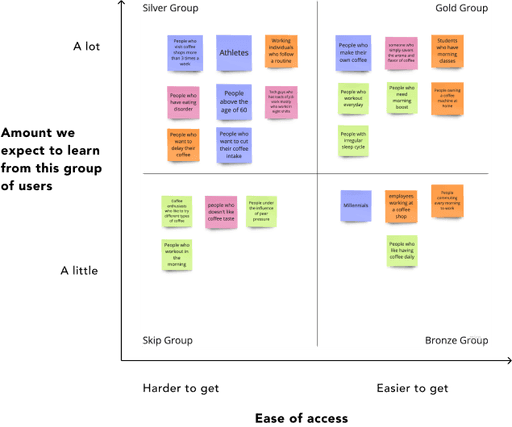
Using this grid, I started my research and focused on the groups that would help me the most. Focussing majorly on the gold group, I started conducting surveys
Using this grid, I started my research and focused on the groups that would help me the most. Focussing majorly on the gold group, I started conducting surveys
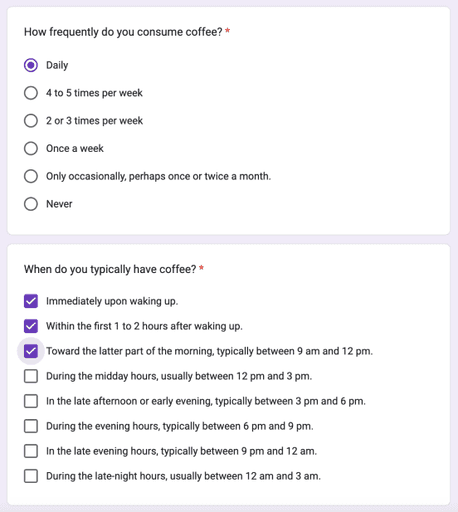
Participants Screener survey questions
Participants Screener survey questions
The questions were formulated keeping in mind the problem statement of the app. The goal was to find people who drink coffee daily and early in the morning after waking up
<— example
The questions were formulated keeping in mind the problem statement of the app. The goal was to find people who drink coffee daily and early in the morning after waking up
<— example
Survey Analysis
Survey Analysis
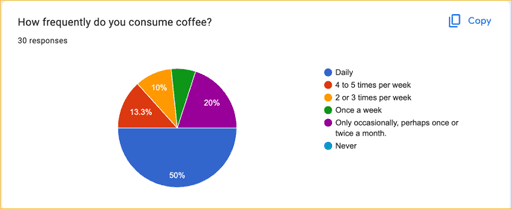
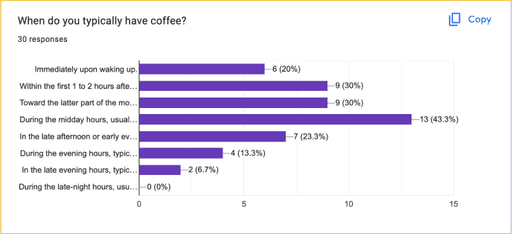
The deciding factors were question numbers 2 and 3, since the main criteria as per the problem statement of the app was that the user consumes caffeine daily. Furthermore, to delay caffeine intake for 90 mins after waking up, the person should be having coffee right after waking up, or with 1-2 hours after waking up.
The deciding factors were question numbers 2 and 3, since the main criteria as per the problem statement of the app was that the user consumes caffeine daily. Furthermore, to delay caffeine intake for 90 mins after waking up, the person should be having coffee right after waking up, or with 1-2 hours after waking up.
15
15
out of 30 people surveyed consumed coffee daily
out of 30 people surveyed consumed coffee daily
15
15
out of 30 people consumed coffee right after waking up or within 1-2 hour after waking up
out of 30 people consumed coffee right after waking up or within 1-2 hour after waking up
12
12
out of 30 people, meeting all conditions, were eligible for the Usability Testing. 4 didn’t want to be part of testing and 2 didn’t revert back.
out of 30 people, meeting all conditions, were eligible for the Usability Testing. 4 didn’t want to be part of testing and 2 didn’t revert back.
06
06
out of 30 people, were eligible and shortlisted to do the Usability Testing
out of 30 people, were eligible and shortlisted to do the Usability Testing
Participants
Participants
Total Number
Total Number
6
Countries
Countries
3
Test Data
Test Data
Testing hours
Testing hours
3
Completed Tasks
Completed Tasks
8
Findings
Findings
Total Issues
Total Issues
42
Total Delighters
Total Delighters
49
Avg Scores
Avg Scores
Confidence score
Confidence score
92.75%
Ease score
Ease score
94.5%
Success Rate
Success Rate
100%
Usability testing summary
Usability testing summary
All the participants found the concept of growing a coffee plant for 90 mins as a way of delaying coffee very interesting.
All participants understood how the app navigation works.
I received some feedback on some flows, of which two were critical and high priority. These were the photo verification step and the points system of coffee garden.
There were some other feedback related to UI as well and I also received some good suggestions as well, like showing pending notifications in Nav bar.
Overall all the participants completed all tasks, with some having confusion about certain aspects, like the point system.
All Usability testings were conducted in-person, rather than online, because it allowed for better interaction, better control over the testing environment, observation of context, building trust, and understanding the body language of the participants. It also provided better feedback as the person was talking face to face.
View Interviews
Participants Task Completion
Participants Task Completion
Six participants underwent individual usability testing, completing eight tasks each. I noted any issues and collected feedback at the end of each session on all app flows and sections.
Six participants underwent individual usability testing, completing eight tasks each. I noted any issues and collected feedback at the end of each session on all app flows and sections.
Observing task time, user confidence, and ease of use helped understand:
Task Efficiency: helped determine the efficiency of the app’s design and usability.
User Confidence: Indicated how intuitive the app is.
Ease of Use: revealed any potential friction points or complexities in the app.
Usability Insights: helped pinpoint specific areas where users struggle, guiding improvements in design and functionality.
Overall Experience: provided a comprehensive understanding of the user experience, highlighting strengths and areas for enhancement in the app’s interface and workflow.
Observing task time, user confidence, and ease of use helped understand:
Task Efficiency: helped determine the efficiency of the app’s design and usability.
User Confidence: Indicated how intuitive the app is.
Ease of Use: revealed any potential friction points or complexities in the app.
Usability Insights: helped pinpoint specific areas where users struggle, guiding improvements in design and functionality.
Overall Experience: provided a comprehensive understanding of the user experience, highlighting strengths and areas for enhancement in the app’s interface and workflow.
Participant
Participant
Participant 1
Participant 1
Participant 2
Participant 2
Participant 3
Participant 3
Participant 4
Participant 4
Participant 5
Participant 5
Participant 6
Participant 6
Task Average
Task Average
Task 1
Task 1
Task 2
Task 2
Task 3
Task 3
Task 4
Task 4
Task 5
Task 5
Task 6
Task 6
Task 7
Task 7
Task 8
Task 8
P
P
P
P
P
P
P
P
P
P
P
P
P
P
P
P
P
P
P
P
P
P
P
P
P
P
P
P
P
P
P
P
P
P
P
P
P
P
P
P
P
P
P
P
P
P
P
P
P
P
P
P
P
P
P
P
P
P
P
P
P
P
P
P
P
P
P
P
P
P
P
P
P
P
P
P
P
P
P
P
P
P
P
P
P
P
P
P
P
P
P
P
P
P
P
P
100%
100%
100%
100%
100%
100%
100%
100%
100%
100%
100%
100%
100%
100%
100%
100%
Average Score
Avg Score
100%
100%
100%
100%
100%
100%
100%
100%
100%
100%
100%
100%
100%
100%
Participants confidence & ease ratings
Participants confidence & ease ratings
Participant
Participant
Participant 2
Participant 2
Participant 3
Participant 3
Participant 4
Participant 4
Participant 4
Participant 4
Participant 5
Participant 5
Participant 6
Participant 6
Task Average
Task Average
Task 1
Task 1
Task 2
Task 2
Task 3
Task 3
Task 4
Task 4
Task 5
Task 5
Task 6
Task 6
Task 7
Task 7
Task 8
Task 8
Task 8
Task 8
Conf
Conf
Ease
Ease
Conf
Conf
Ease
Ease
Conf
Conf
Ease
Ease
Conf
Conf
Ease
Ease
Conf
Conf
Ease
Ease
Conf
Conf
Ease
Ease
Conf
Conf
Ease
Ease
Conf
Conf
Ease
Ease
Conf
Conf
Ease
Ease
10
10
10
10
10
10
10
10
10
10
10
10
10
10
10
10
10
10
10
10
6
6
6
6
8
8
8
8
10
10
10
10
10
10
10
10
10
10
10
10
10
10
10
10
10
10
10
10
8
8
10
10
10
10
10
10
6
6
6
6
8
8
8
8
10
10
10
10
10
10
10
10
10
10
10
10
10
10
10
10
10
10
10
10
8
8
10
10
10
10
10
10
8
8
8
8
8
8
8
8
10
10
10
10
10
10
10
10
10
10
10
10
10
10
10
10
10
10
10
10
8
8
10
10
10
10
10
10
8
8
8
8
10
10
10
10
10
10
10
10
10
10
10
10
10
10
10
10
10
10
10
10
10
10
10
10
10
10
10
10
10
10
10
10
6
6
6
6
8
8
8
8
10
10
10
10
10
10
10
10
10
10
10
10
10
10
10
10
10
10
10
10
8
8
10
10
10
10
10
10
10
10
10
10
8
8
8
8
10
10
10
10
10
10
10
10
10
10
10
10
10
10
10
10
10
10
10
10
8.6
8.6
10
10
10
10
10
10
7.3
7.3
7.3
7.3
8.3
8.3
8.3
8.3
10
10
10
10
10
10
10
10
Person Average
Person
Average
9.25
9.25
9.25
9.25
9.37
9.37
9.62
9.62
9.12
9.12
9.62
9.62
9.36
9.36
Normalized %
Normal-
ized %
92.5%
92.5%
92.5%
92.5%
93.7%
93.7%
96.2%
96.2%
91.2%
91.2%
96.2%
96.2%
93.6%
93.6%
*Ratings are based on the observations of the moderator
*Ratings are based on the observations of the moderator
usability testing data synthesis
usability testing data synthesis
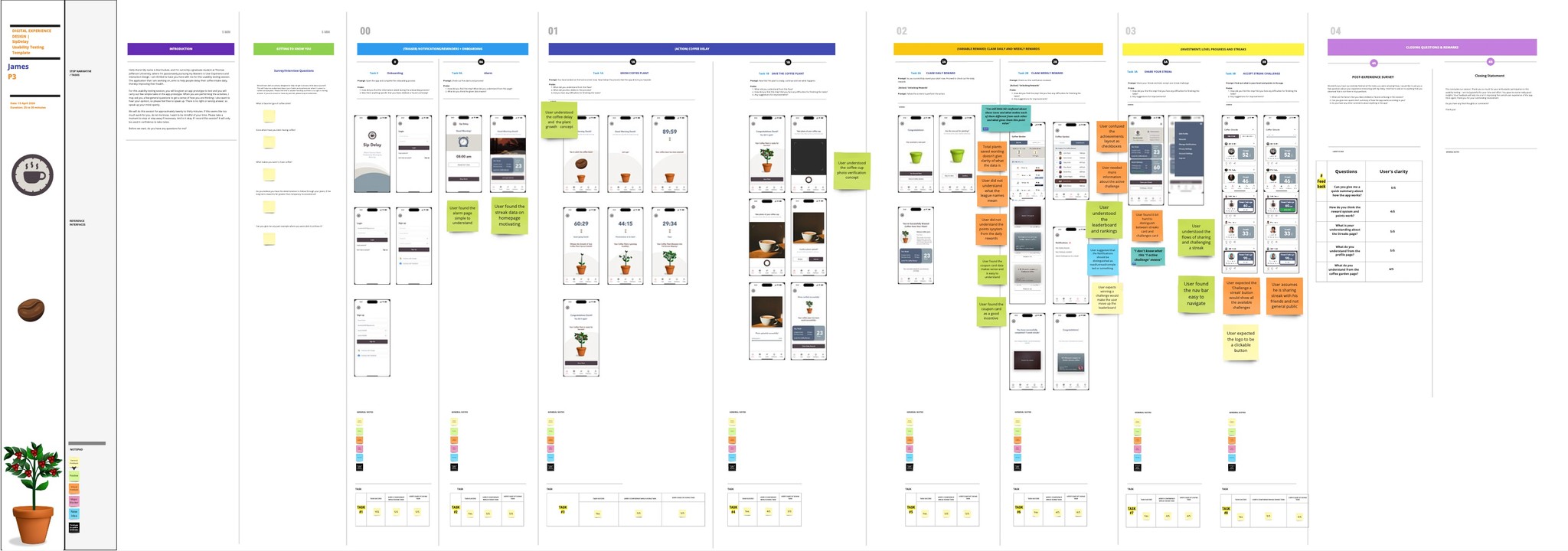
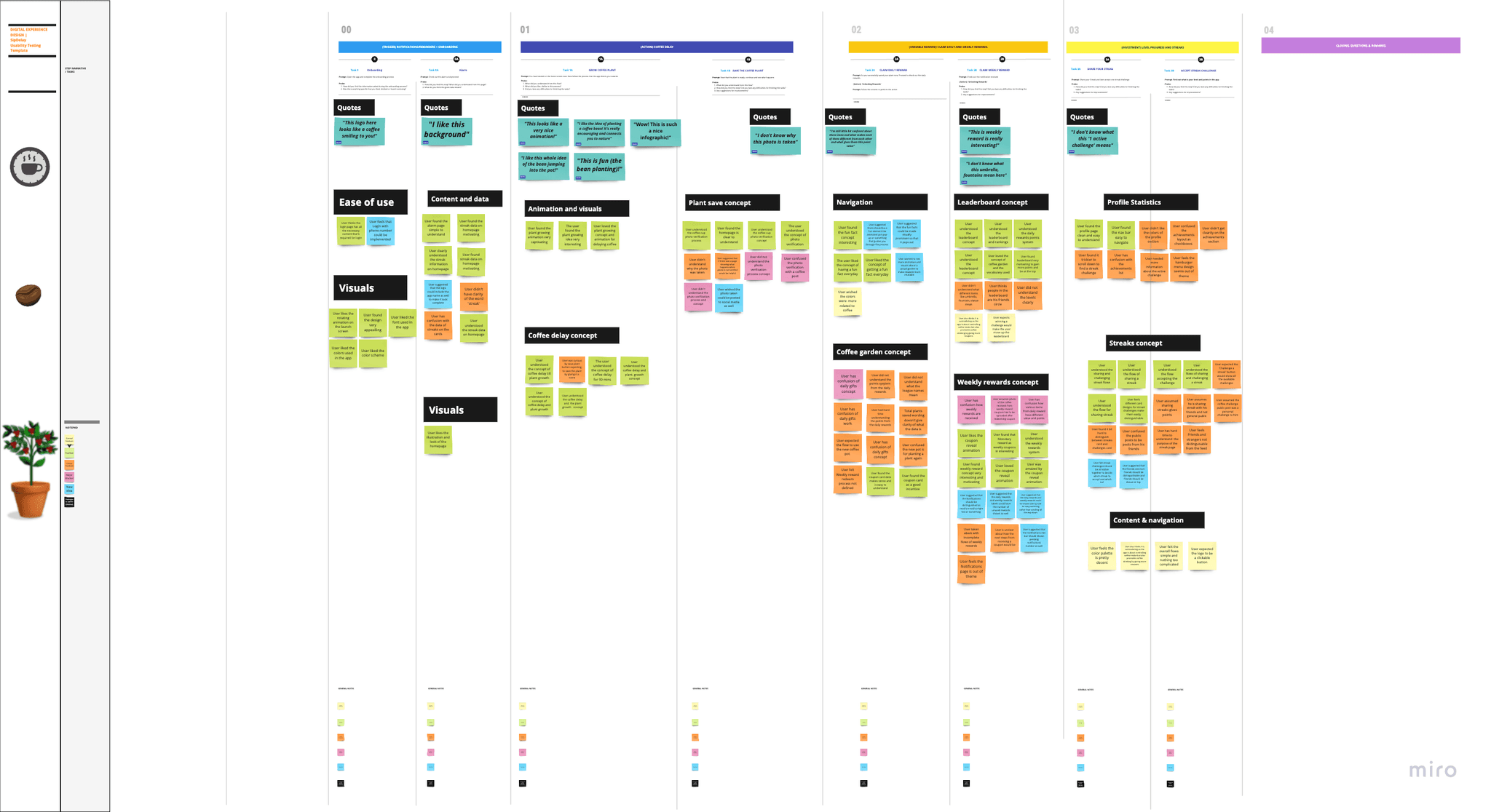
I created a template to organize the data from the usability testing sessions. I filled out these templates for each of the six participants, detailing positive aspects, negative aspects, and specific quotes for all eight tasks. Then, I consolidated the data from all six templates onto a single canvas to optimize and analyze the information comprehensively. Photos below shows the template of one participant and the consolidated data.
I created a template to organize the data from the usability testing sessions. I filled out these templates for each of the six participants, detailing positive aspects, negative aspects, and specific quotes for all eight tasks. Then, I consolidated the data from all six templates onto a single canvas to optimize and analyze the information comprehensively. Photos below shows the template of one participant and the consolidated data.
Frequency matrix
Frequency matrix
Through frequency matrix I captured usage patterns, identified issues, for data-driven improvements. The matrix helped me to:
Identify common issues
Highlight popular features
Optimize design
Prioritize enhancements
Support data-driven decisions
Through frequency matrix I captured usage patterns, identified issues, for data-driven improvements. The matrix helped me to:
Identify common issues
Highlight popular features
Optimize design
Prioritize enhancements
Support data-driven decisions
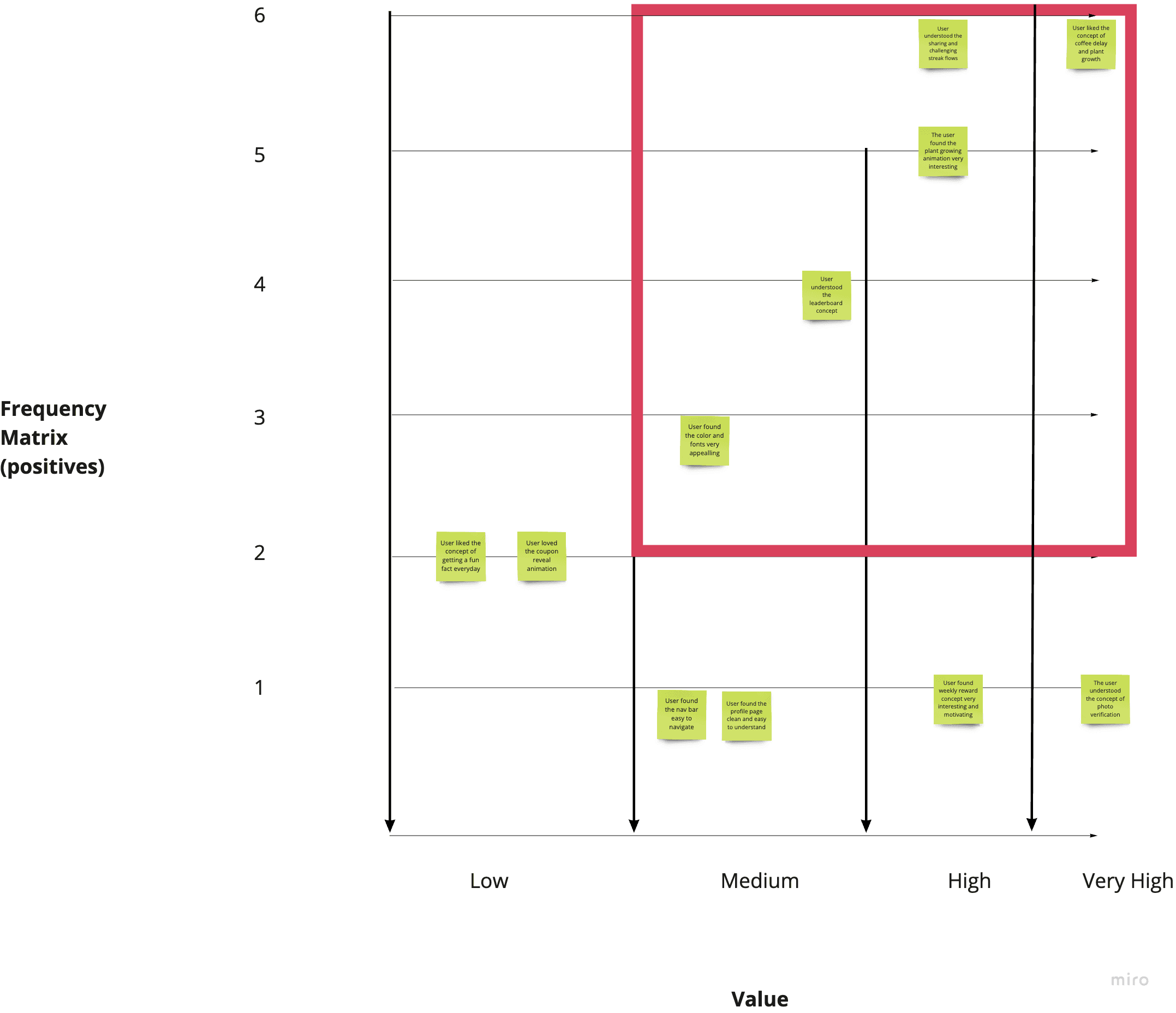
Positives
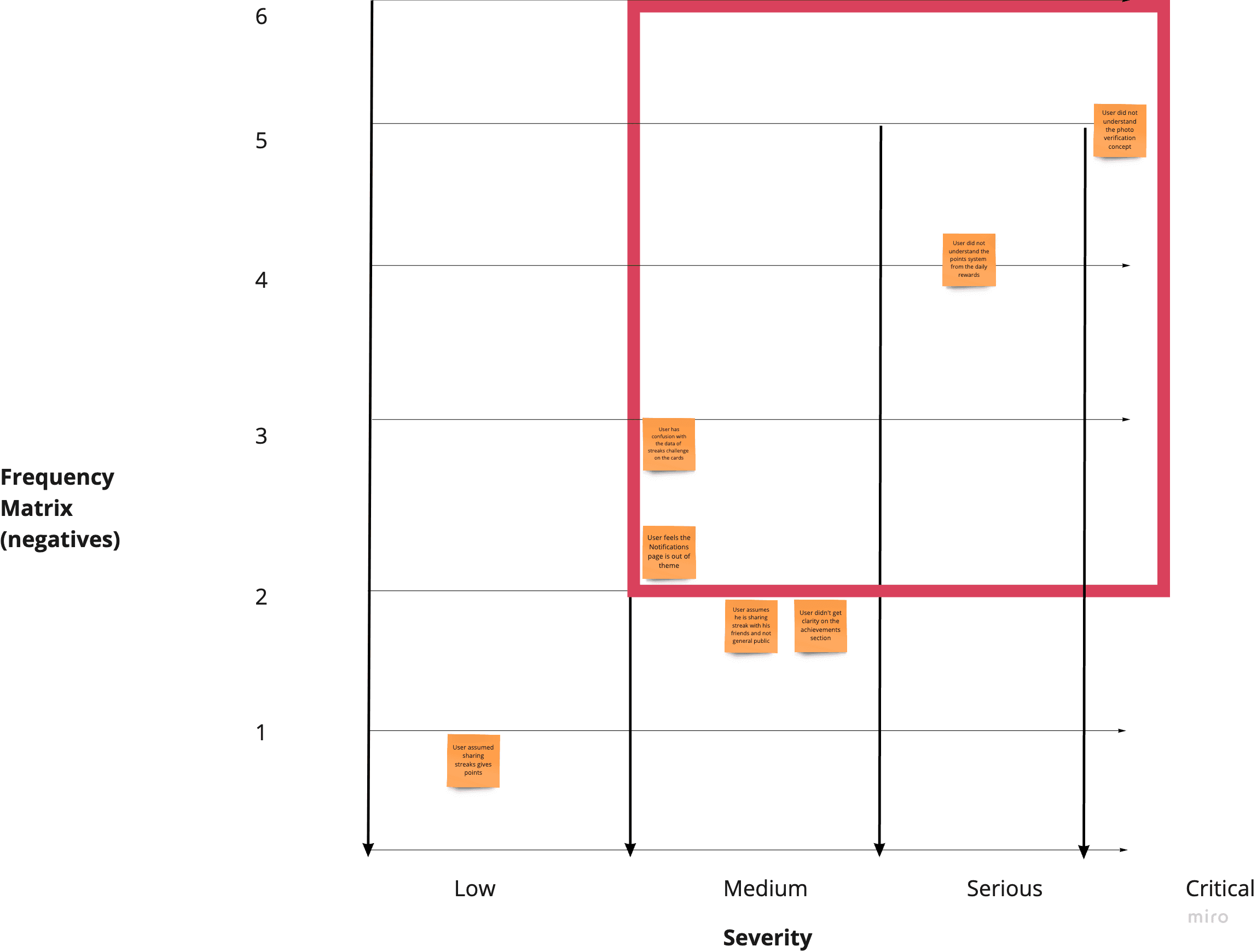
Negatives
Usability testing issues & delighters
Usability testing issues & delighters
Critical
Serious
Low
"I don't know why this photo is taken"
"I don't know why this photo is taken"
Users did not understand the photo verification concept. They couldn’t relate how taking photo saved the plant.
Users did not understand the photo verification concept. They couldn’t relate how taking photo saved the plant.
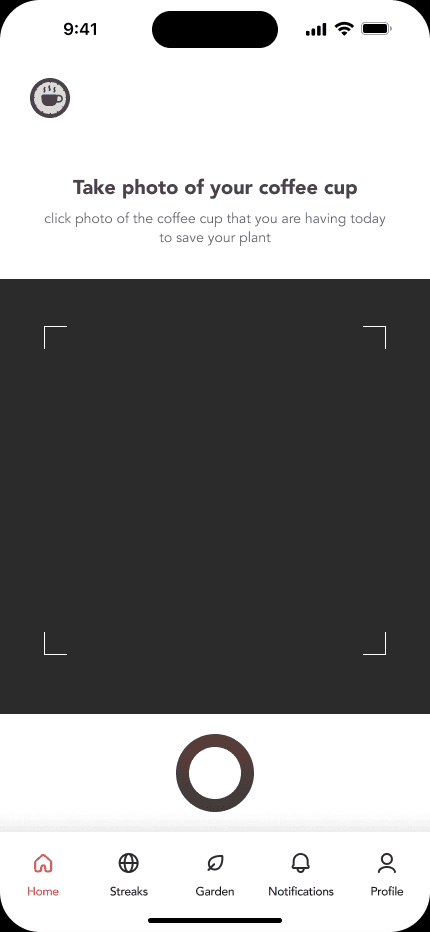
"I'm still little bit confused about what gives them this point value"
Users did not understand the points system from the daily rewards
"I'm still little bit confused about what gives them this point value"
Users did not understand the points system from the daily rewards
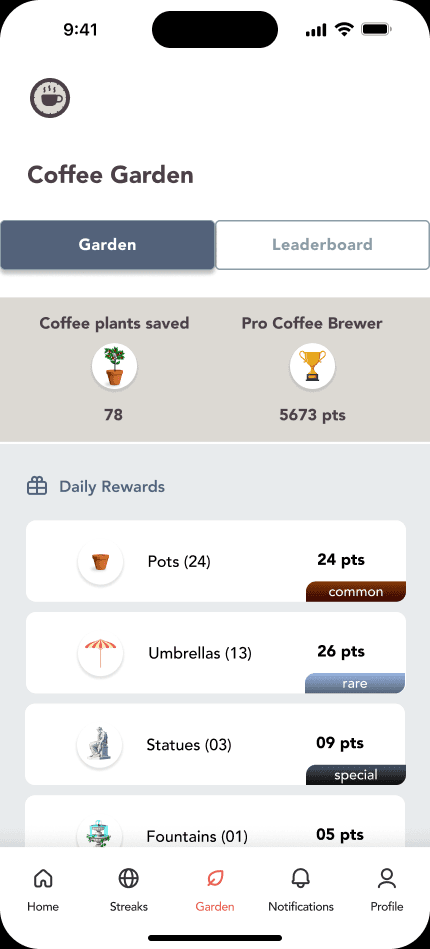
"I don't know what this '1 active challenge' means"
User has confusion with the data on the streaks challenge cards
"I don't know what this '1 active challenge' means"
User has confusion with the data on the streaks challenge cards
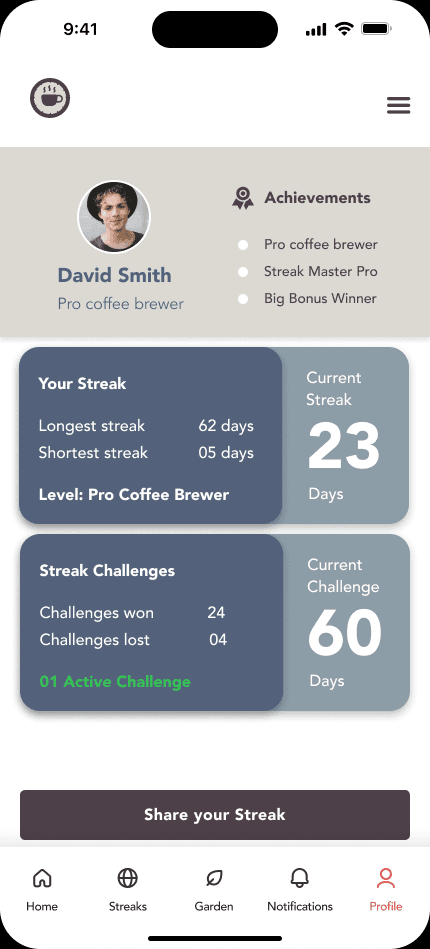
"These seem like one has to check one of them (like checkbox)"
User didn't have clarity on the achievements section and how the user levels up
User didn't have clarity on the achievements section and how the user levels up
"I like the idea of planting a coffee bean! It's really encouraging and connects you to nature"
"I like the idea of planting a coffee bean! It's really encouraging and connects you to nature"
Users liked the concept of growing a coffee plant to delay coffee intake
Users liked the concept of growing a coffee plant to delay coffee intake
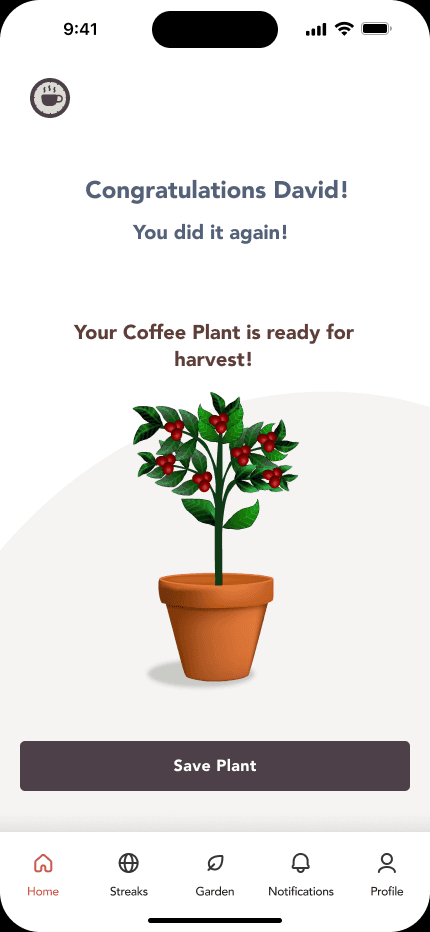
Users understood the flows for sharing a streak and challenging a streak.
Users understood the flows for sharing a streak and challenging a streak.
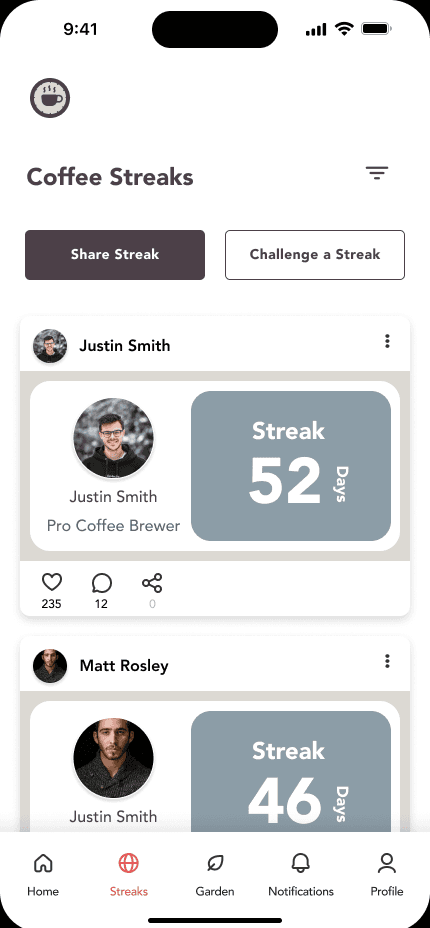
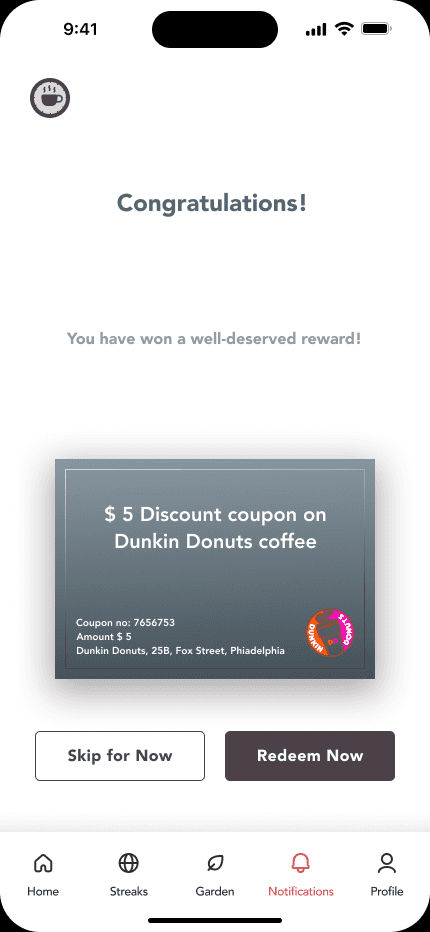
"This weekly reward is really interesting!"
"This weekly reward is really interesting!"
Users found weekly reward concept very interesting and motivating
Users found weekly reward concept very interesting and motivating
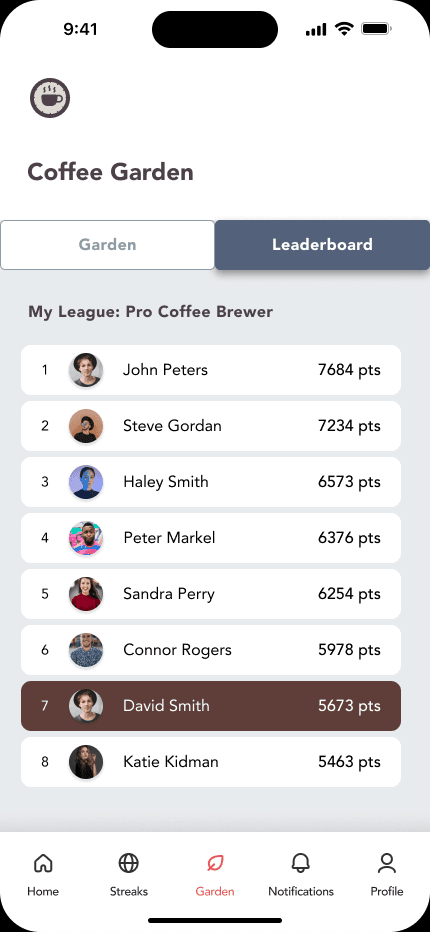
Users understood the leaderboard concept
Users understood the leaderboard concept

Design changes
Design changes
Based on the feedback certain design changes were implemented. The SCAMPER technique was implemented in designing the solutions. SCAMPER is an acronym for these techniques:
Substitute something
Combine it with something else
Adapt something to it
Modify, magnify, or minify it
Put it to some other use
Eliminate something
Reverse or rearrange it.
Based on the feedback certain design changes were implemented. The SCAMPER technique was implemented in designing the solutions. SCAMPER is an acronym for these techniques:
Substitute something
Combine it with something else
Adapt something to it
Modify, magnify, or minify it
Put it to some other use
Eliminate something
Reverse or rearrange it.
1) Photo verification process
1) Photo verification process
Old
Old
New
New
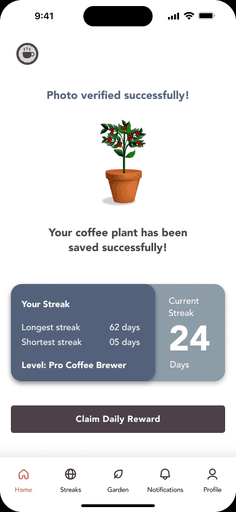
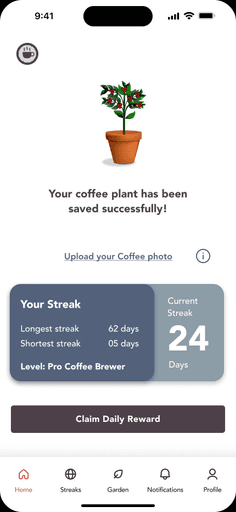
Initial Process:
Users nurtured a virtual coffee plant.
After 90 minutes, uploading a live photo of their coffee cup was mandatory to save the plant and earn rewards.
Challenge:
3/6 users didn't understand the purpose of the photo verification, despite completing the step.
Initial Process:
Users nurtured a virtual coffee plant.
After 90 minutes, uploading a live photo of their coffee cup was mandatory to save the plant and earn rewards.
Challenge:
3/6 users didn't understand the purpose of the photo verification, despite completing the step.
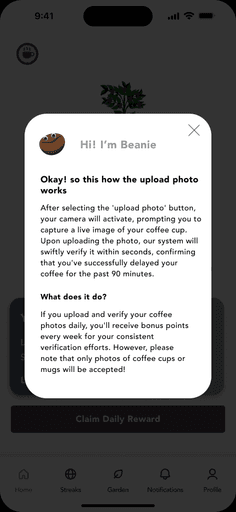
Solution:
Implemented an optional pop-up guide for clarity.
Revised Approach:
Photo verification is now optional, offering bonus points instead of being mandatory for plant survival.
Users can directly save their plants and choose to verify photos later for bonus points.
Benefit:
Streamlined user experience by eliminating a confusing and unnecessary step.
Scamper used:
Modify
Combine
Put to another use
2) The Points System from Daily Rewards
2) The Points System from Daily Rewards
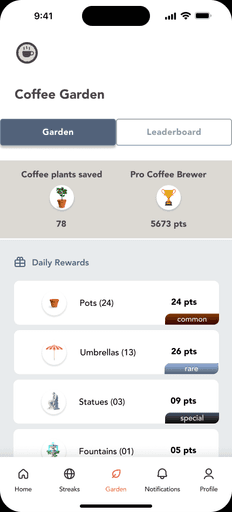
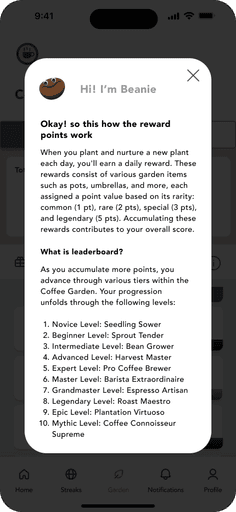
Before: The reward items cards caused confusion. Users earned garden items (pots, etc.) but didn't understand their point value or how they impacted their overall score.
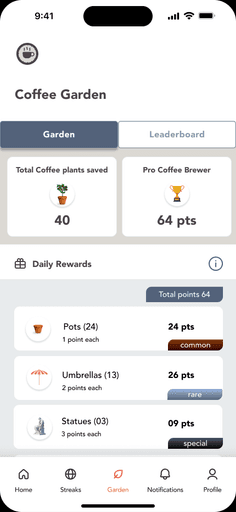
After: The layout was updated. Reward cards now show points for each item (common, rare, etc.) and also total points. A pop-up explains the point system and how it affects the overall score.
Benefit: Users understand rewards and their progress towards a higher score.
Scamper used:
Modify
Before: The reward items cards caused confusion. Users earned garden items (pots, etc.) but didn't understand their point value or how they impacted their overall score.
After: The layout was updated. Reward cards now show points for each item (common, rare, etc.) and also total points. A pop-up explains the point system and how it affects the overall score.
Benefit: Users understand rewards and their progress towards a higher score.
Scamper used:
Modify
Old
Old
New
New
3) The Points System from Daily Rewards
3) The Points System from Daily Rewards
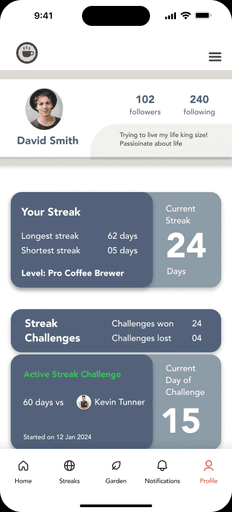
Issue:
The 'Achievements' labels were mistaken for checkboxes and were not found useful or exciting by users.
The streak challenge card lacked context about the challenge opponent.
Design Change:
Removed 'Achievements' labels and replaced them with 'followers,' 'following,' and 'bio' tabs.
Redesigned the streak challenge card to show details such as the number of challenge days, the current day, the opponent's name, and the start date.
Benefit:
The profile page is now cleaner and more intuitive.
Users can clearly understand the details of the streak challenge.
Scamper:
Eliminate
Modify
Combine
Substitute
Issue:
The 'Achievements' labels were mistaken for checkboxes and were not found useful or exciting by users.
The streak challenge card lacked context about the challenge opponent.
Design Change:
Removed 'Achievements' labels and replaced them with 'followers,' 'following,' and 'bio' tabs.
Redesigned the streak challenge card to show details such as the number of challenge days, the current day, the opponent's name, and the start date.
Benefit:
The profile page is now cleaner and more intuitive.
Users can clearly understand the details of the streak challenge.
Scamper:
Eliminate
Modify
Combine
Substitute
Old
Old
New
New
4) The notifications page
4) The notifications page
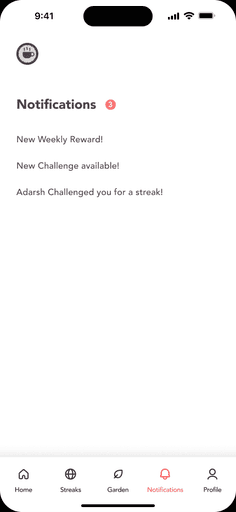
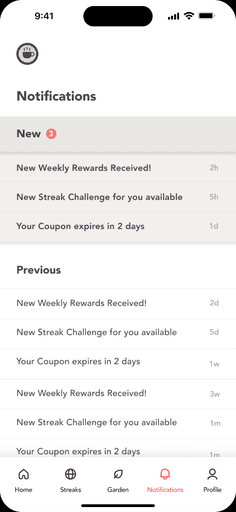
Issue:
The Notifications page didn't match the app design and lacked detailed status information.
Redesign:
Updated layout and colors to follow the app theme.
Created separate sections for 'New' and 'Old' notifications.
Added timestamps to show when notifications were received.
Benefit:
The Notifications page is now cohesive with the app design.Users can easily prioritize notifications and see their status clearly.
Scamper:
Adapt
Modify
Issue:
The Notifications page didn't match the app design and lacked detailed status information.
Redesign:
Updated layout and colors to follow the app theme.
Created separate sections for 'New' and 'Old' notifications.
Added timestamps to show when notifications were received.
Benefit:
The Notifications page is now cohesive with the app design.Users can easily prioritize notifications and see their status clearly.
Scamper:
Adapt
Modify
Old
Old
New
New
5) The hamburger menu on profile page
5) The hamburger menu on profile page
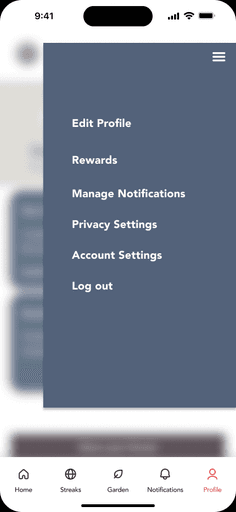
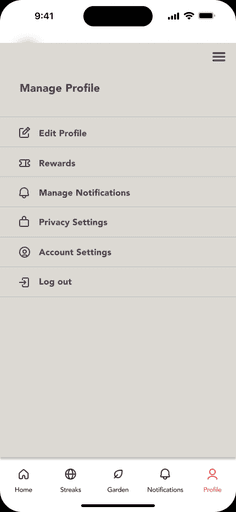
Issues:
The Menu design was out of theme and didn't match the app's aesthetics.
Redesign:
Added icons to make the menu more relatable.
Changed the layout to a full-screen card instead of a cropped overlay to match the app theme.
Added a title to provide context for the menu.
Benefits:
The Menu now aligns with the app's aesthetics.
Users find the menu more intuitive and visually appealing.
The title helps users understand the menu context easily.
Scamper:
Adapt
Modify
Issues:
The Menu design was out of theme and didn't match the app's aesthetics.
Redesign:
Added icons to make the menu more relatable.
Changed the layout to a full-screen card instead of a cropped overlay to match the app theme.
Added a title to provide context for the menu.
Benefits:
The Menu now aligns with the app's aesthetics.
Users find the menu more intuitive and visually appealing.
The title helps users understand the menu context easily.
Scamper:
Adapt
Modify
Old
Old
New
New
conclusion
conclusion
The app concept was very well received by the testing participants. They loved the idea of growing and nurturing a coffee plant to delay their coffee intake while earning rewards. The app design successfully adhered to the Hook Model of Trigger, Action, Reward, and Investment. Participants appreciated the visual representation of the growing plant and the overall user interface, which provided an emotional and nurturing role that resonated with them.
The unique concept of the coffee garden, with its variable daily and weekly rewards, was particularly well-liked. Usability testing highlighted several areas for improvement, leading to changes that enhanced the overall user experience. This feedback-driven approach ensured the app not only met but exceeded user expectations, creating an engaging and rewarding experience that users were excited to incorporate into their daily routines.
The app concept was very well received by the testing participants. They loved the idea of growing and nurturing a coffee plant to delay their coffee intake while earning rewards. The app design successfully adhered to the Hook Model of Trigger, Action, Reward, and Investment. Participants appreciated the visual representation of the growing plant and the overall user interface, which provided an emotional and nurturing role that resonated with them.
The unique concept of the coffee garden, with its variable daily and weekly rewards, was particularly well-liked. Usability testing highlighted several areas for improvement, leading to changes that enhanced the overall user experience. This feedback-driven approach ensured the app not only met but exceeded user expectations, creating an engaging and rewarding experience that users were excited to incorporate into their daily routines.