
Electric Bus Fleet Management SAAS Platform
Electric Bus Fleet Management SAAS Platform
Problem
Problem
While platforms existed for managing fuel-based bus fleets, there was no efficient system for electric bus fleets. Operators struggled to plan routes, schedule vehicles, and assign drivers while accounting for unique constraints like battery range, charging time, and driver availability. This gap led to inefficiencies, increased errors, and wasted time in daily fleet operations.
goal
goal
To design a web-based SAAS platform for efficiently managing the day-to-day operations and maintenance of electric bus fleet
About
About
Duration: Mar '22 - Aug '22
Role: UI & UX Designer
Software: Figma
Personal contribution presented:
1) Route & Trip planning module, Driver Rostering and Vehicle Scheduling
2) Training & Certifications module
Design Team
Design Team
Nirbhay Agarwal
( Sr. UX Designer, Amazon Bedrock )
Arnav Kumar Tripathi
( PhD in Design, IIT Delhi )
Atul Dudule
( UXID Masters in TJU )
Needs
Needs
Fleet Operators Need:
A user-friendly platform to manage electric bus operations and maintenance efficiently.
Route & Trip Planning Needs:
Streamlined processes for creating new routes, assigning stops, and planning efficient trips for electric buses.
Driver & Vehicle Management Needs:
User-friendly tools to manage driver rosters, assign schedules, and track vehicle maintenance for the electric bus fleet.
Employee Training Needs:
An engaging and effective training & certification module within the platform to encourage employees to complete job-related courses.
Fleet Operators Need:
A user-friendly platform to manage electric bus operations and maintenance efficiently.
Route & Trip Planning Needs:
Streamlined processes for creating new routes, assigning stops, and planning efficient trips for electric buses.
Driver & Vehicle Management Needs:
User-friendly tools to manage driver rosters, assign schedules, and track vehicle maintenance for the electric bus fleet.
Employee Training Needs:
An engaging and effective training & certification module within the platform to encourage employees to complete job-related courses.
Opportunities
Opportunities
Streamlined Navigation:
Simplify the menu structure by grouping related features.
Implement a navigation menu with quick access to essential modules.
Enhanced Route and Trip Planning:
Seamless planning of routes and trips
Ease in data upload and download
Interactive Training:
Create an engaging training module with interactive quizzes, videos, and simulations.
Personalize training content based on employee roles.
Streamlined Navigation:
Simplify the menu structure by grouping related features.
Implement a navigation menu with quick access to essential modules.
Enhanced Route and Trip Planning:
Seamless planning of routes and trips
Ease in data upload and download
Interactive Training:
Create an engaging training module with interactive quizzes, videos, and simulations.
Personalize training content based on employee roles.
Solutions
Solutions
Fleet Operators Needs: A user-friendly platform to manage electric bus operations and maintenance efficiently. Streamlined processes for creating new routes, assigning stops, and planning efficient trips for electric buses. User-friendly tools to manage driver rosters, assign schedules, and track vehicle maintenance for the electric bus fleet.
Fleet Operators Needs: A user-friendly platform to manage electric bus operations and maintenance efficiently. Streamlined processes for creating new routes, assigning stops, and planning efficient trips for electric buses. User-friendly tools to manage driver rosters, assign schedules, and track vehicle maintenance for the electric bus fleet.
Solutions:
Develop a web-based SaaS platform with a clean and intuitive interface. Provide comprehensive dashboards for real-time fleet overview, including vehicle location, battery status, and upcoming maintenance needs.
Integrate route planning tools with trip scheduling to automatically generate efficient trip schedules.
Implement a drag-and-drop route builder with real-time traffic and weather data integration.
Allow for optimization of charging stops based on battery range and strategically placed charging stations.
Develop a driver rostering system that considers driver qualifications, and availability.
Offer a visual calendar interface for assigning schedules and tracking vehicle assignments.
Integrate a comprehensive maintenance management system with automated alerts for preventive maintenance and repair scheduling.
Solutions:
Develop a web-based SaaS platform with a clean and intuitive interface. Provide comprehensive dashboards for real-time fleet overview, including vehicle location, battery status, and upcoming maintenance needs.
Integrate route planning tools with trip scheduling to automatically generate efficient trip schedules.
Implement a drag-and-drop route builder with real-time traffic and weather data integration.
Allow for optimization of charging stops based on battery range and strategically placed charging stations.
Develop a driver rostering system that considers driver qualifications, and availability.
Offer a visual calendar interface for assigning schedules and tracking vehicle assignments.
Integrate a comprehensive maintenance management system with automated alerts for preventive maintenance and repair scheduling.
Employee Training Needs: An engaging and effective training & certification module within the platform to encourage employees to complete job-related courses.
Solutions:
Implement a gamified learning experience with points and levels to motivate employees.
Offer personalized learning paths based on individual roles and knowledge gaps.
Solutions:
Implement a gamified learning experience with points and levels to motivate employees.
Offer personalized learning paths based on individual roles and knowledge gaps.
Results
Results
Testing Participants: A group of 10 bus fleet operators with varying levels of experience (including those who may have used basic fleet management software but not a specialized electric bus platform) were recruited for usability testing.
Testing Methodology: A combination of moderated usability testing sessions and post-test surveys were conducted.
Testing Participants: A group of 10 bus fleet operators with varying levels of experience (including those who may have used basic fleet management software but not a specialized electric bus platform) were recruited for usability testing.
Testing Methodology: A combination of moderated usability testing sessions and post-test surveys were conducted.
Focus Areas: The testing focused on evaluating the platform's intuitiveness, efficiency in completing core tasks, and overall user experience for managing an electric bus fleet.
Focus Areas: The testing focused on evaluating the platform's intuitiveness, efficiency in completing core tasks, and overall user experience for managing an electric bus fleet.
Learning the Platform:
Metric: Time to Complete Basic Tasks (average) - This measured the time it took users to complete core functionalities like creating a route, assigning a trip, and scheduling driver rosters.
Results: The average time to complete basic tasks fell within a reasonable range, indicating a user-friendly learning curve.
Efficiency and Workflow
1) Metric: Task Completion Rate (percentage) - This measured the success rate of users in completing assigned tasks within the platform.
Results: A high task completion rate (e.g., 85% or above) for core functionalities indicated that the platform effectively supported efficient workflows.
2) Metric: User Feedback on Workflow Satisfaction (survey data) - This measured user perception of the platform's efficiency in helping them manage their fleet.
Results: Positive user feedback on workflow satisfaction (e.g., average rating of 4 out of 5) indicated the platform helped streamline their work.
Specific Functionalities
1) Route & Trip Planning: Users were asked to rate the ease of using the drag-and-drop route builder and trip scheduling features.
Results: High user ratings (e.g., average rating of 4.5 out of 5) indicated satisfaction with these features.
2) Driver & Vehicle Management: Users were asked to evaluate the effectiveness of the visual calendar interface for driver rostering, and vehicle scheduling.
Results: Positive user feedback on the interface's clarity and ease of use (e.g., comments like "easy to see at a glance" or "intuitive for scheduling") signified successful design for these functionalities.
3) Employee Training: Users were asked about their experience with the training & certification modules, particularly the gamified elements.
Results: Positive feedback on the training experience (e.g., "engaging" or "helped me learn faster") suggested the gamified approach increased user engagement.
Overall Platform Effectiveness
Metric: User Satisfaction Score (average) based on post-test surveys - This measured overall user perception of the platform's value and ease of use.
Results: A high user satisfaction score (e.g., 8.3 out of 10) indicated the platform successfully addressed the needs of bus fleet operators in managing electric buses.
These results demonstrate the initial usability and potential of the new design for streamlining electric bus fleet operations.
Future Considerations
This initial usability testing provides a strong foundation. However, as the platform is deployed to a wider user base, it's important to continue monitoring user feedback and gather data on actual fleet management efficiency in a real-world setting.
This can involve A/B testing of specific features, tracking user adoption rates, and conducting follow-up surveys to gauge long-term user satisfaction and identify areas for further improvement.
Domains
Electrical
Transportation
Data
Communications
Technical
Major Duties
Monitor the data related to vehicles, locations, chargers, drivers and routes
Adding new routes, trips, drivers, vehicles, locations, chargers
Assigning driver duties and creating schedule for all the drivers and vehicles
Time & Frequency
Daily
Monthly
Daily
Pain-points
Viewing data on different pages
Not being bale to make optimized routes and trips
Managing driver's duties, day-offs, route and trip preferences

Ajay Singh
Ajay Singh
26, New Delhi
26, New Delhi
Operations
Operations
Responsible for designing the routes and creating day-to-day schedules to provide good service and efficient operations
Responsible for designing the routes and creating day-to-day schedules to provide good service and efficient operations
Domains
Electrical
Transportation
Data
Communications
Technical
Technical proficiency
Technical proficiency
Web
Web
Desktop
Desktop
Mobile
Mobile
Additional comments
Additional comments
Ajay is a very hard-working individual who is very diligent in his work. He is appreciated by his colleagues for his punctuality and helpful nature.
Ajay is a very hard-working individual who is very diligent in his work. He is appreciated by his colleagues for his punctuality and helpful nature.
Major Duties
Monitor the data related to vehicles, locations, chargers, drivers and routes
Adding new routes, trips, drivers, vehicles, locations, chargers
Assigning driver duties and creating schedule for all the drivers and vehicles
Time &
Frequency
Daily
Monthly
Daily
Pain-points
Viewing data on different pages
Not being bale to make optimized routes and trips
Managing driver's duties, day-offs, route and trip preferences
User Persona
User Persona
Design System
Design System
A standardized central design system was adhered to during the product design phase. This comprehensive design system included essential elements such as icons, text sizes, colors, buttons, input fields, dropdowns, search fields, and others necessary for the product. Employing this design system facilitated consistency across all modules, particularly important when multiple designers were concurrently working on different aspects of the product.
A standardized central design system was adhered to during the product design phase. This comprehensive design system included essential elements such as icons, text sizes, colors, buttons, input fields, dropdowns, search fields, and others necessary for the product. Employing this design system facilitated consistency across all modules, particularly important when multiple designers were concurrently working on different aspects of the product.
Color scheme
Color scheme
The chosen color scheme centered around shades of blue as the primary color, symbolizing trust, honesty, and reliability—qualities integral to a corporate product.
The chosen color scheme centered around shades of blue as the primary color, symbolizing trust, honesty, and reliability—qualities integral to a corporate product.
Primary
Primary
#164C63
#164C63
Secondary
Secondary
#101828
#101828
Tertiary
Tertiary
#667085
#667085
Typography
Typography
Lexend was the chosen typeface for this project, with distinct variations of the Lexend font employed for both headings and body text.
Lexend was the chosen typeface for this project, with distinct variations of the Lexend font employed for both headings and body text.
Lexend
Lexend
Design components
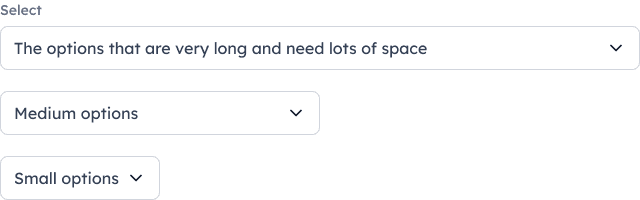
The design included a hierarchical structure and standardized sizes for various components to handle different data needs. For instance, dropdowns came in large, medium, and small sizes for flexibility.
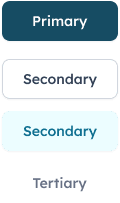
For Calls to Action (CTA), a strategic layout was used with primary, secondary, and tertiary buttons, each with hover and disabled states for better user interaction and feedback.
Autolayout in Figma ensured consistent design and standardized spacing across all pages, maintaining uniformity in sections, headings, buttons, input fields, and other elements.
The design included a hierarchical structure and standardized sizes for various components to handle different data needs. For instance, dropdowns came in large, medium, and small sizes for flexibility.
For Calls to Action (CTA), a strategic layout was used with primary, secondary, and tertiary buttons, each with hover and disabled states for better user interaction and feedback.
Autolayout in Figma ensured consistent design and standardized spacing across all pages, maintaining uniformity in sections, headings, buttons, input fields, and other elements.
The interface design
The interface design


Login & homepage
Login & homepage
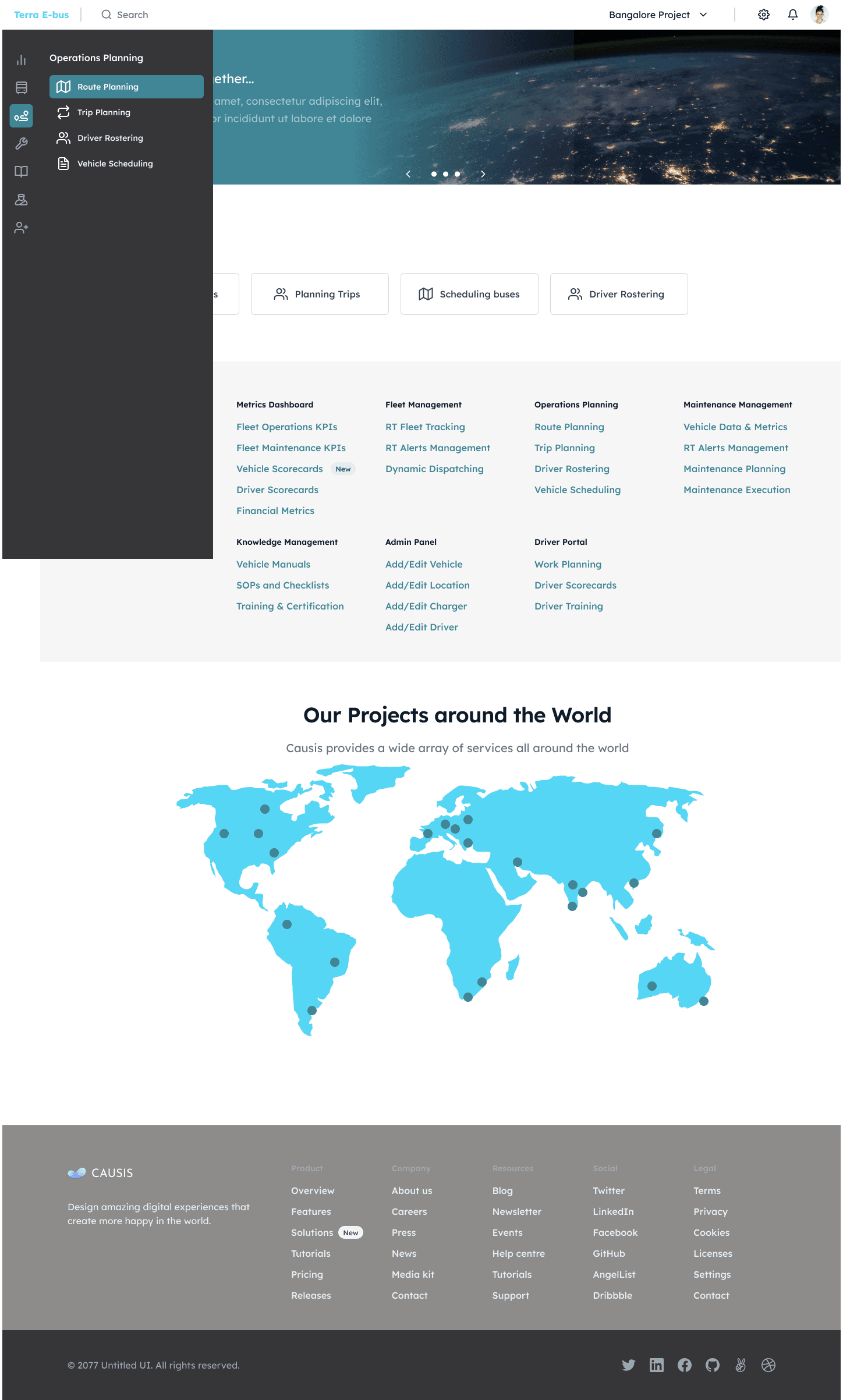
Onboarding & Access
Frictionless login with integrated sign-up and password recovery
Guided entry for secure, rapid platform access
Dashboard & Navigation
Centralized command center with key fleet insights
Adaptive sidebar maximizes space, enables instant module switching
One-hover navigation balances expert speed with beginner clarity
Onboarding & Access
Frictionless login with integrated sign-up and password recovery
Guided entry for secure, rapid platform access
Dashboard & Navigation
Centralized command center with key fleet insights
Adaptive sidebar maximizes space, enables instant module switching
One-hover navigation balances expert speed with beginner clarity

Route planning
Route planning
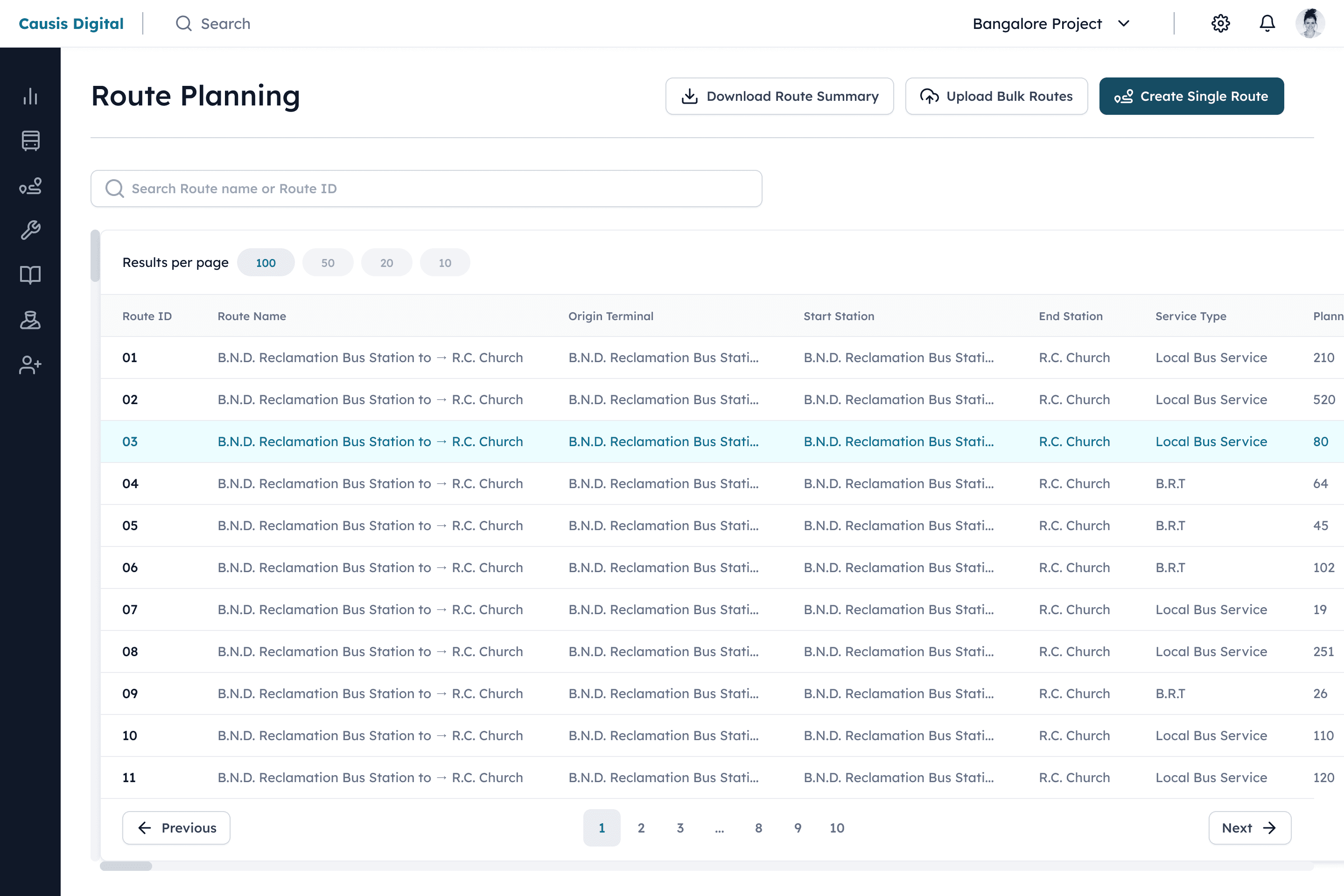
Centralized Control Panel - Manage all routes with search, edit, and bulk import/export capabilities
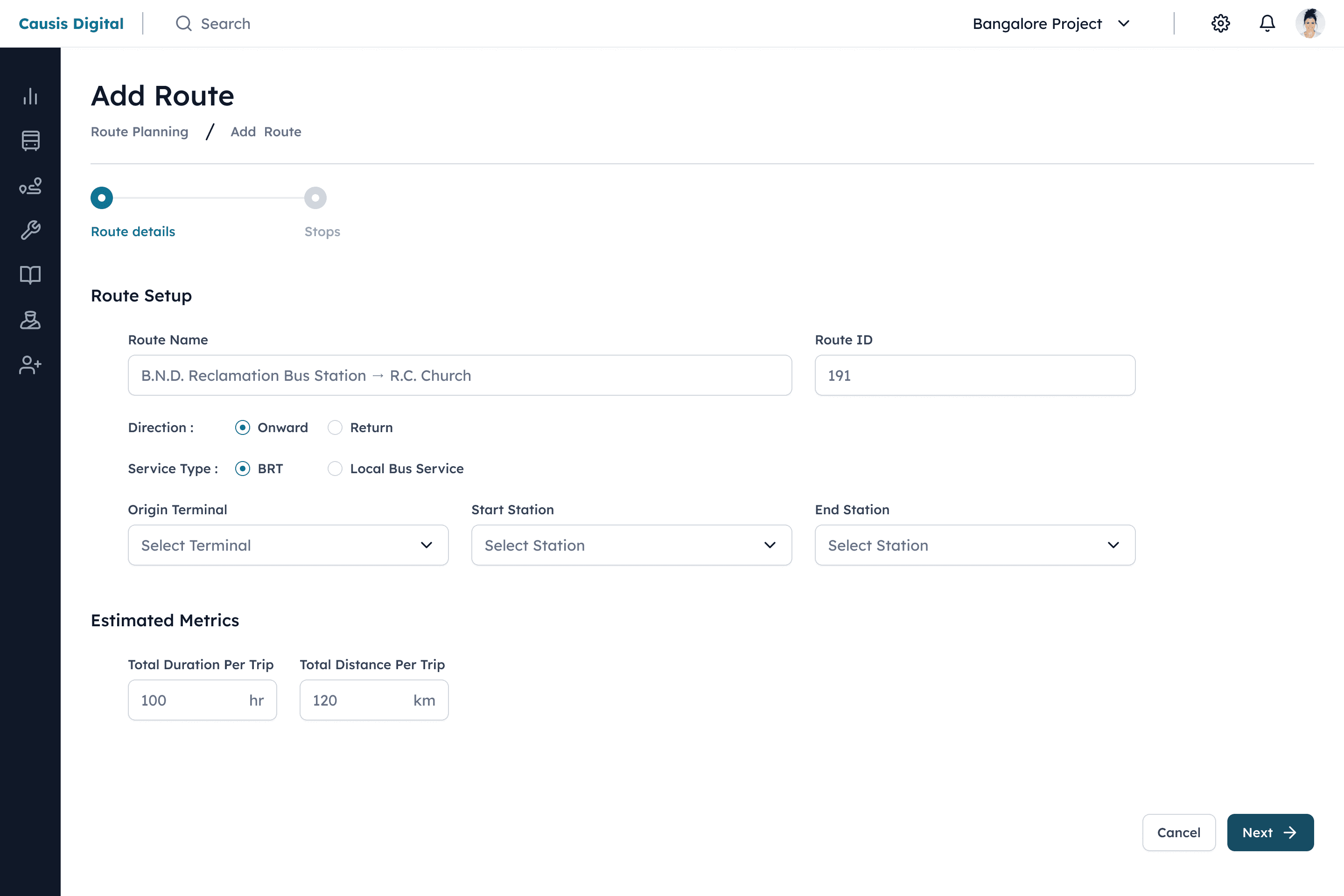
Guided Creation Process - Two-step workflow separates route definition from stop-level scheduling
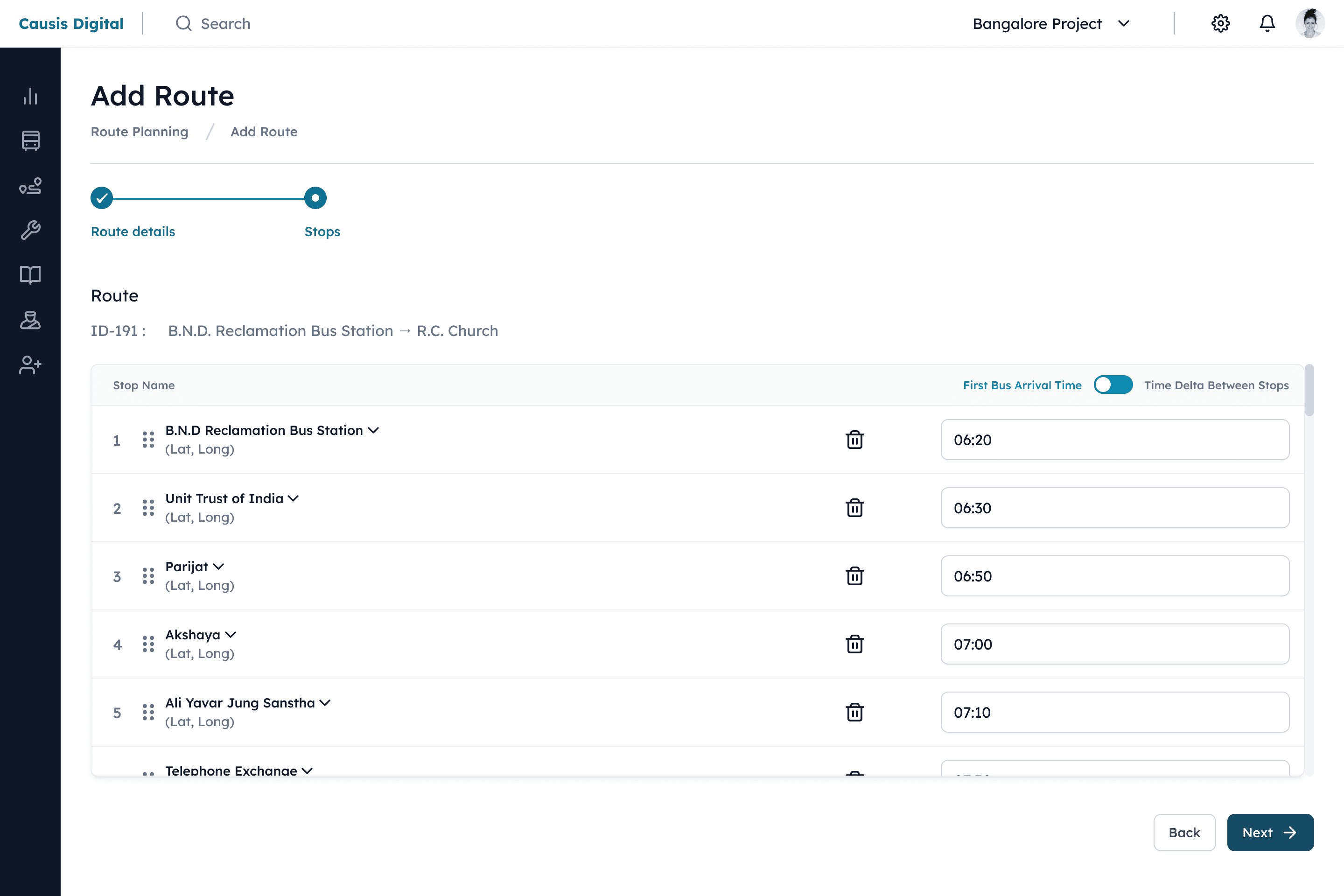
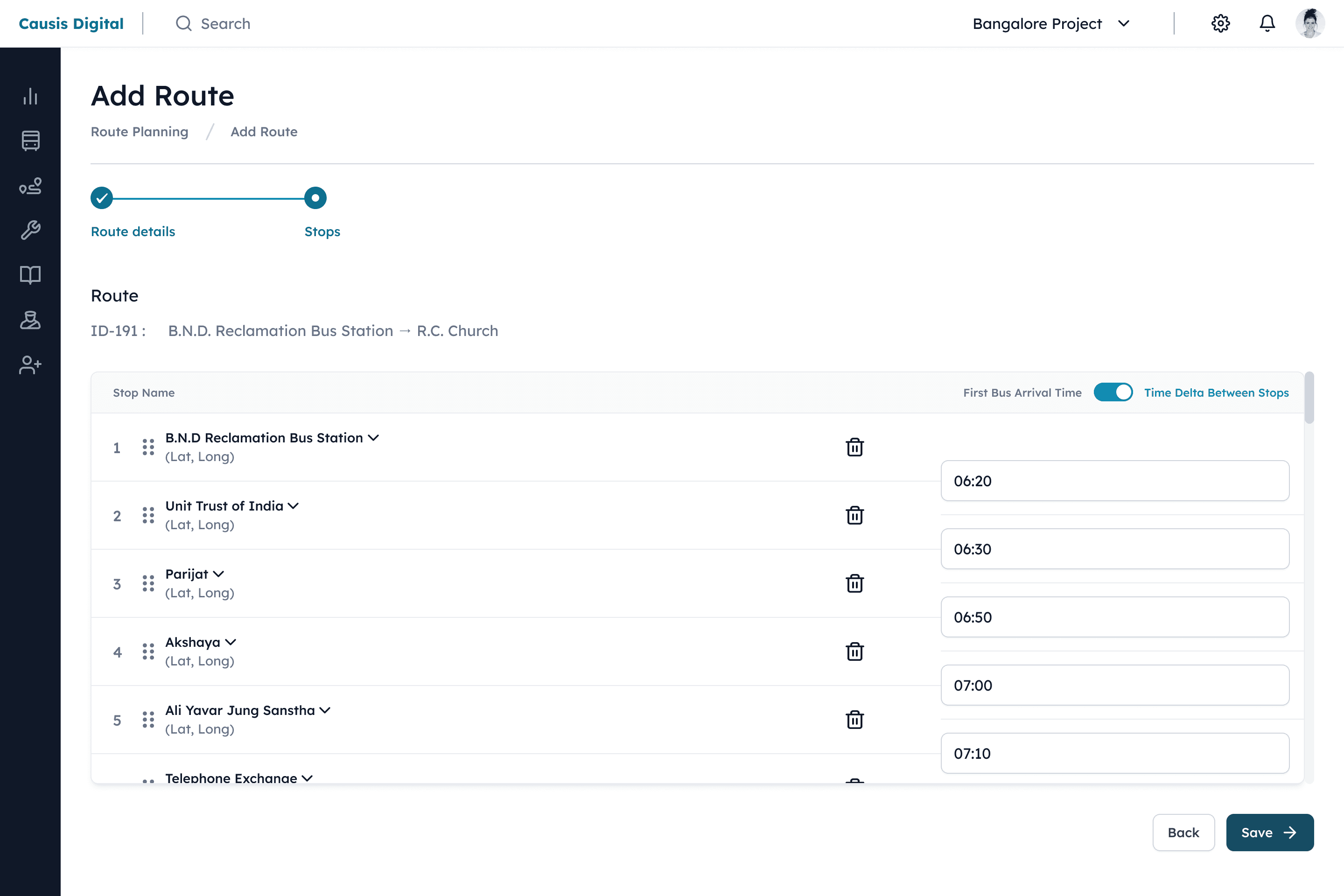
Smart Stop Management - Dynamic selection and sequencing from verified stop database
Flexible Timing Options - Support for both absolute times and relative intervals between stops
Optimized Data Entry - Purpose-built form controls (sliders, radio buttons) minimize input errors
Key Benefit: Transforms complex route planning into a systematic process that ensures accuracy while accommodating diverse operational preferences.
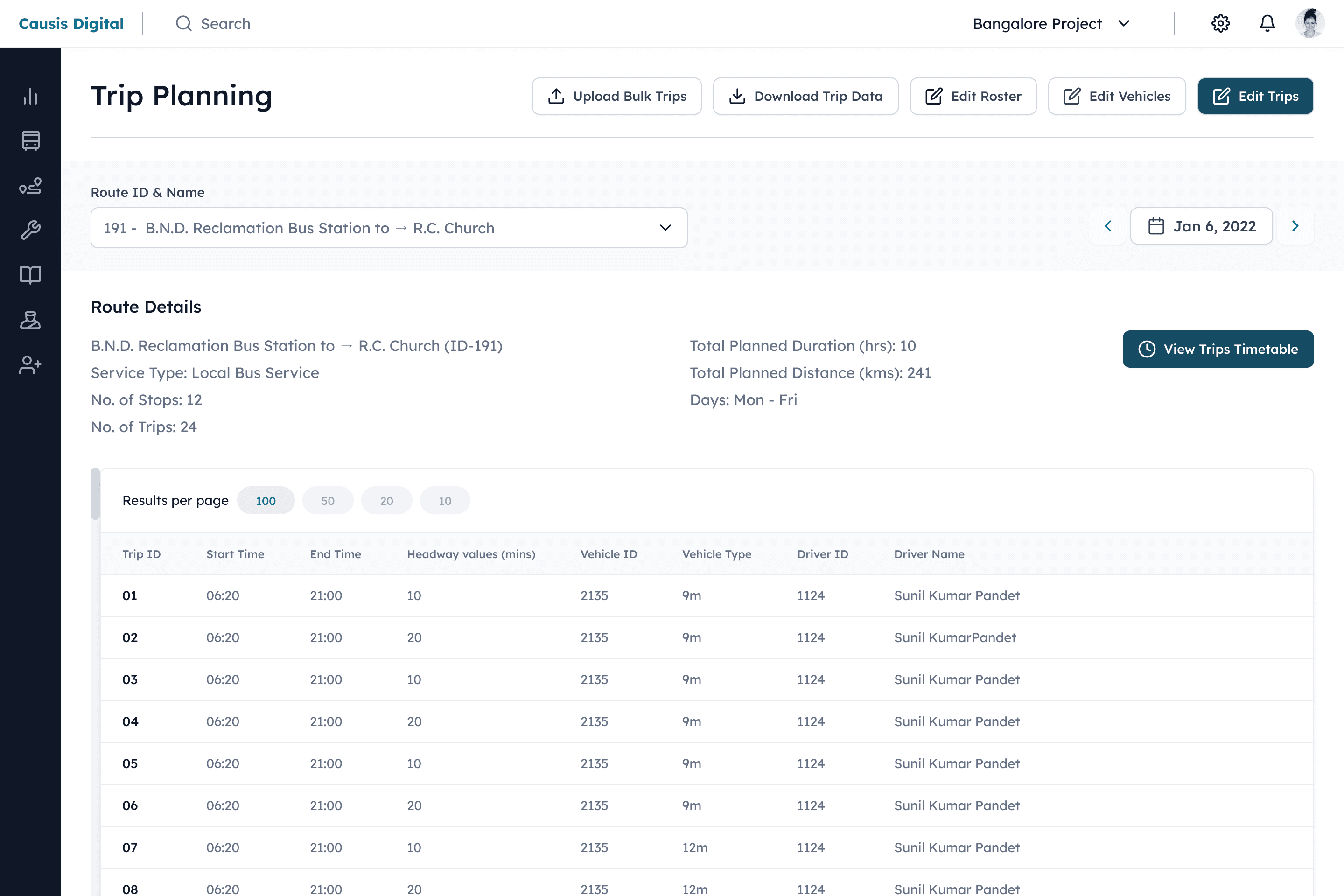
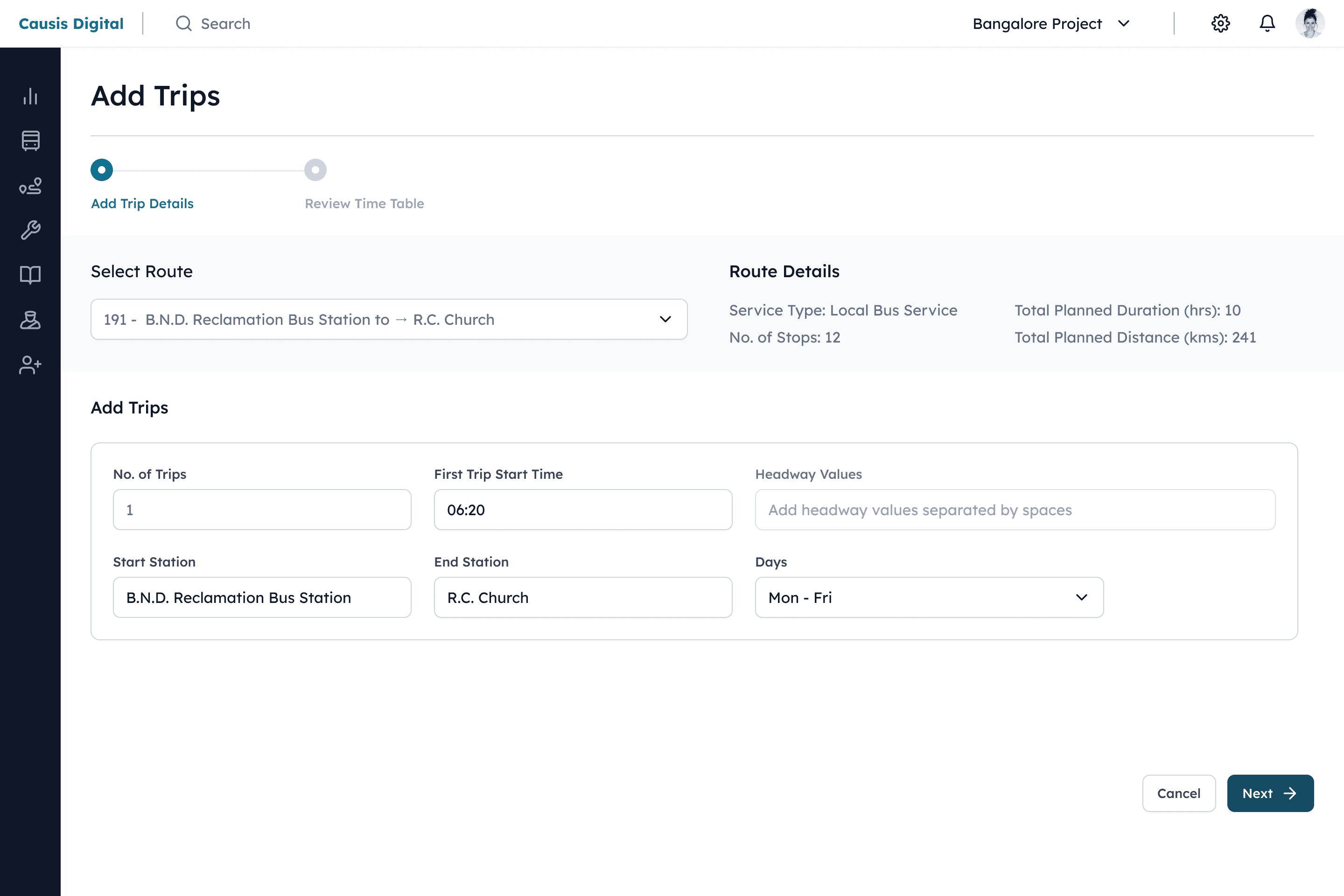
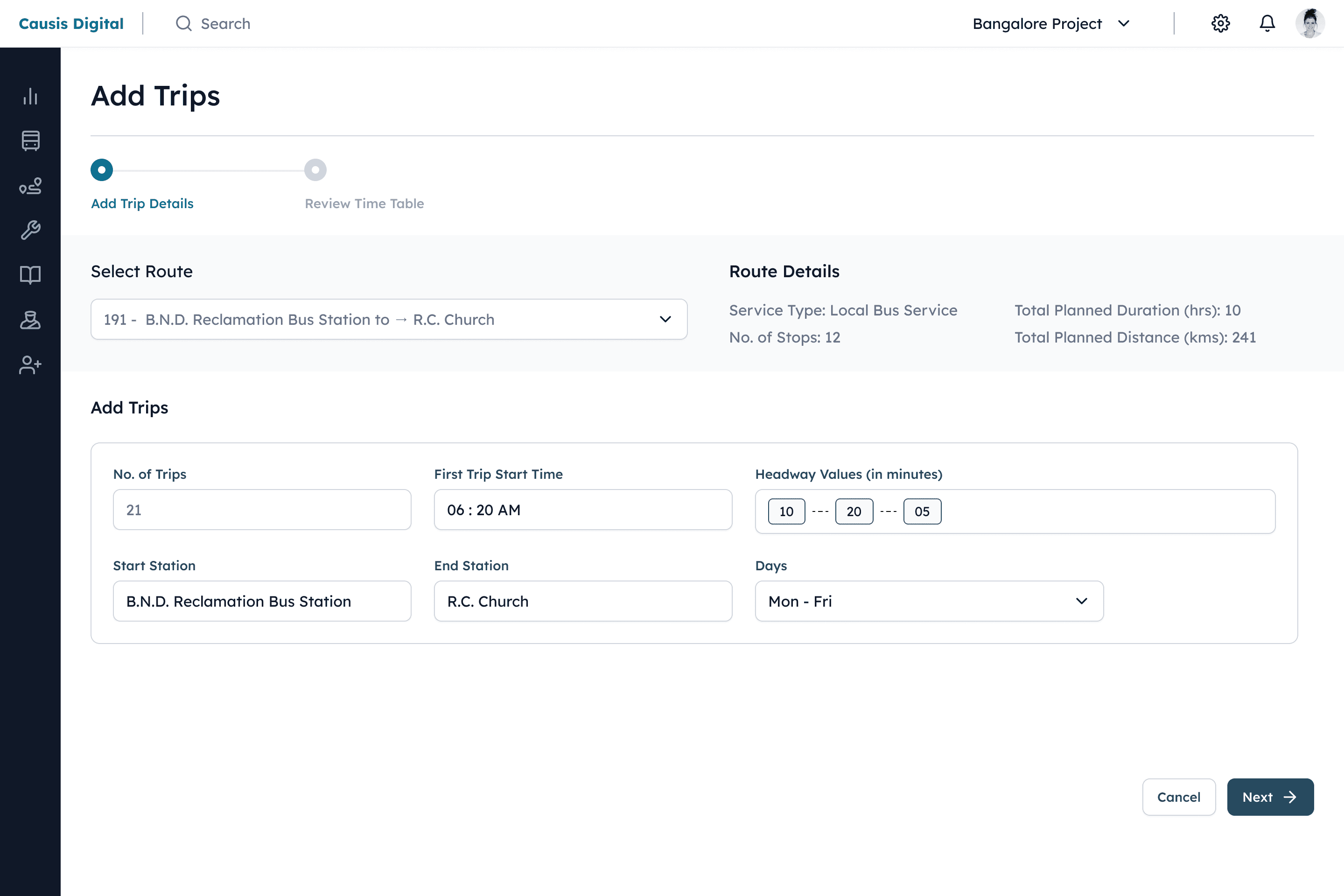
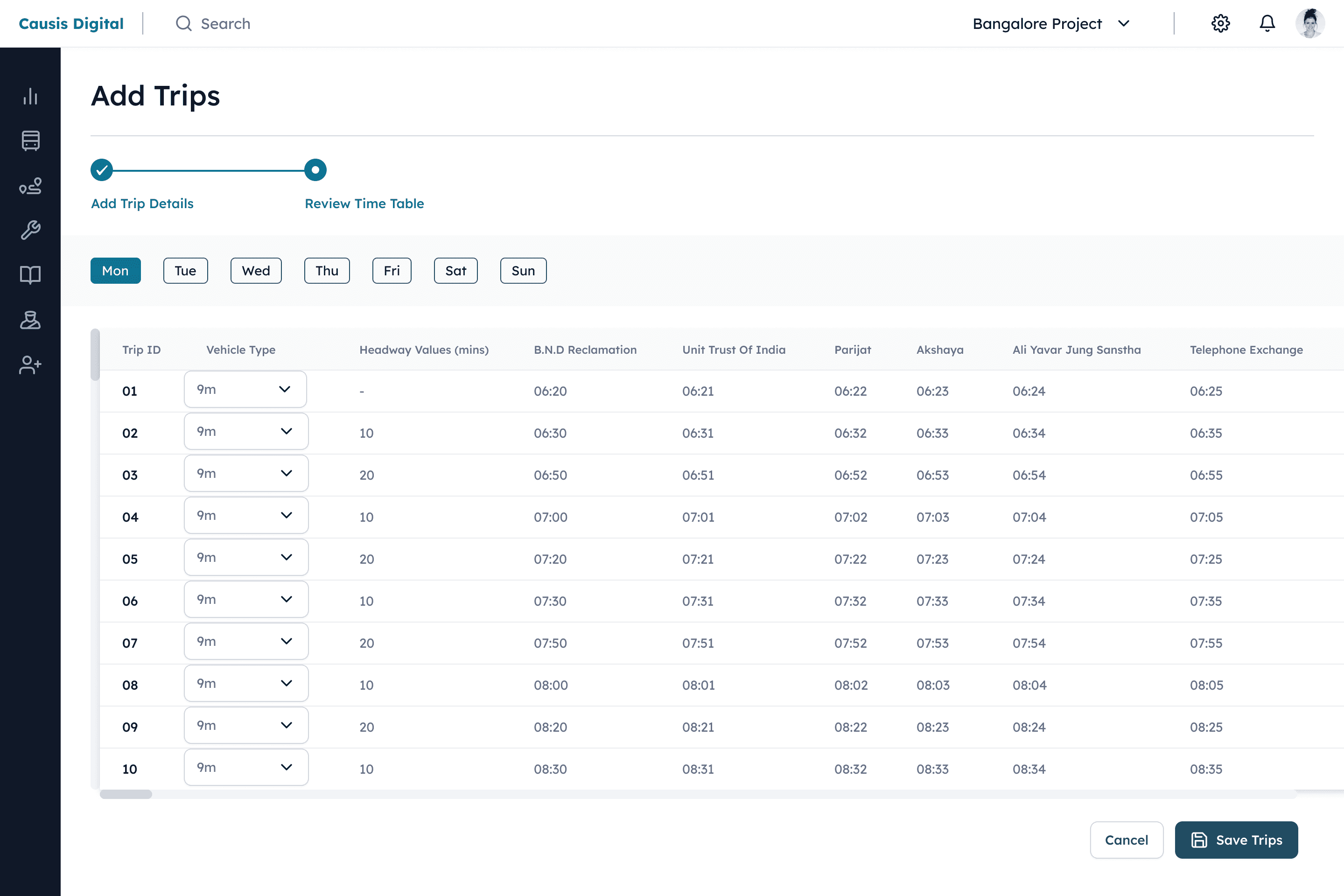
Trip planning
Trip planning
Unified Dashboard: View routes, timetables, vehicles, and drivers in a single consolidated interface
Dual-Mode Operations: Handle individual trips or bulk uploads/downloads with equal efficiency
Calendar Integration: Manage and filter schedules seamlessly across dates and timeframes
Automated Scheduling: Generate recurring trips instantly using headway-based calculations
Visual Timetabling: Preview and assign vehicle types within a clear, scannable schedule layout
Design Impact: Transforms complex multi-variable scheduling into an intuitive workflow that reduces planning time while ensuring optimal resource allocation.
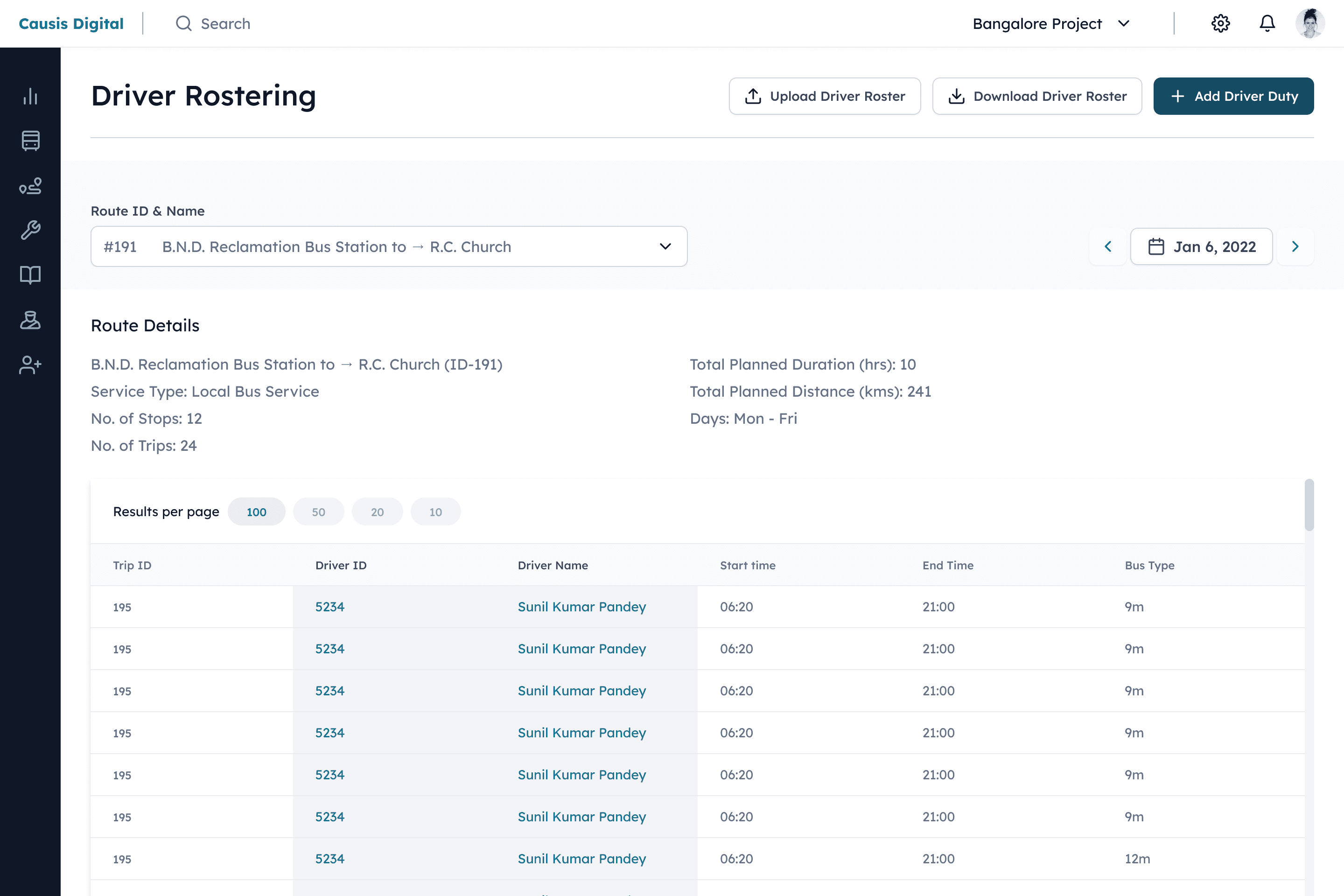
Driver Rostering
Centralized Duty Management: Upload, download, and view all driver schedules in a single table filtered by route and date
Streamlined Duty Creation: Add new driver assignments with guided form fields and checkboxes for specific duty days
Context-Aware Interface: View relevant route and trip details side-by-side during roster creation for informed decision-making
Intuitive Guidance: Placeholder text and clear labeling minimize errors during data entry
Key Benefit: Ensures optimal driver coverage through an efficient, error-resistant scheduling system that maintains critical operational context.
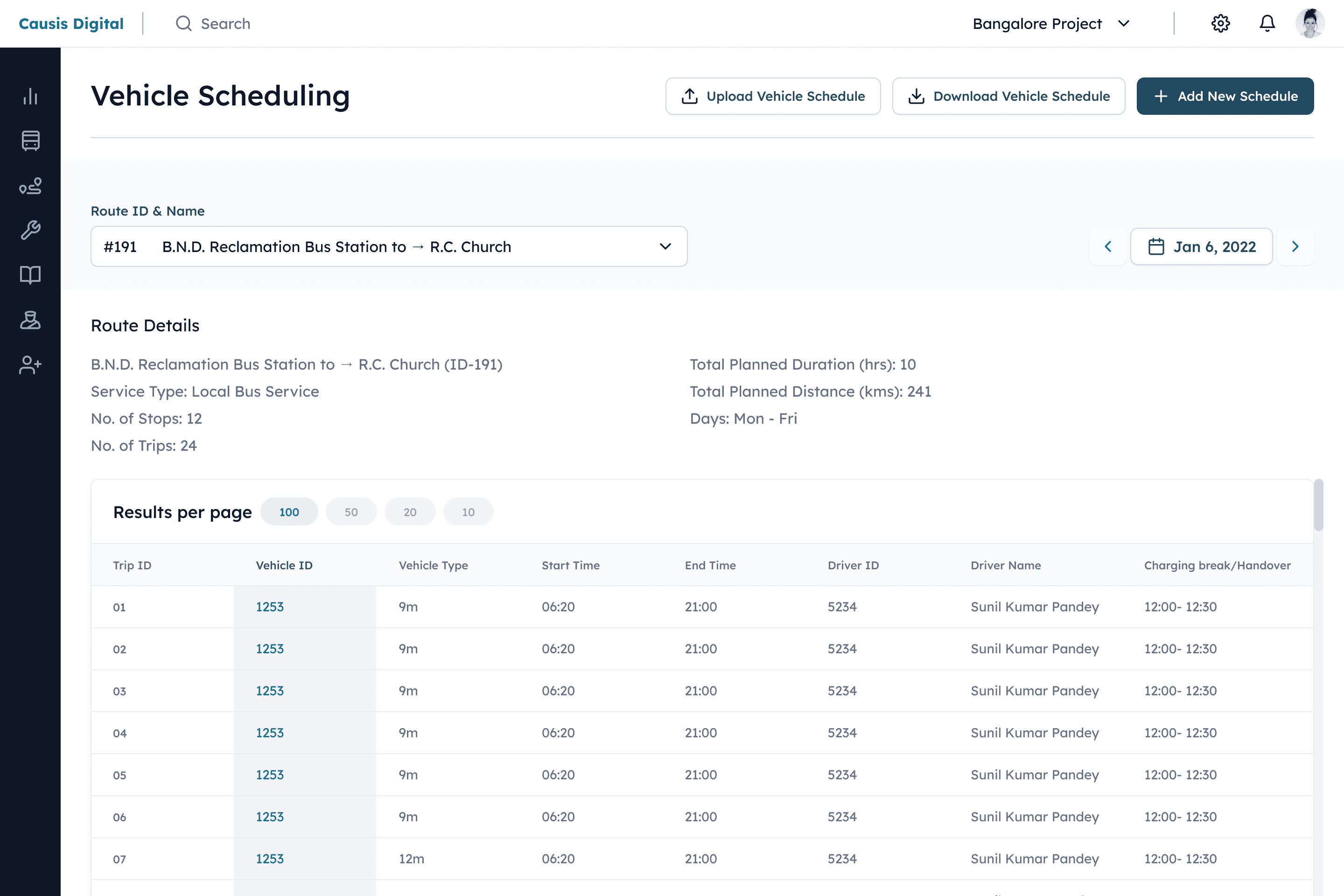
vehicle scheduling
Unified Scheduling Framework: Leverages consistent patterns from driver rostering for intuitive user adoption
Streamlined Vehicle Assignment: Simple form-based workflow to assign vehicles by ID to specific routes and trips
Flexible Weekly Planning: Select operational days with checkbox controls for efficient recurring schedule creation
Centralized Fleet Management: Maintains complete vehicle deployment records in an organized database
Key Benefit: Ensures optimal fleet utilization through a familiar, efficient scheduling system that maintains operational consistency with driver management.
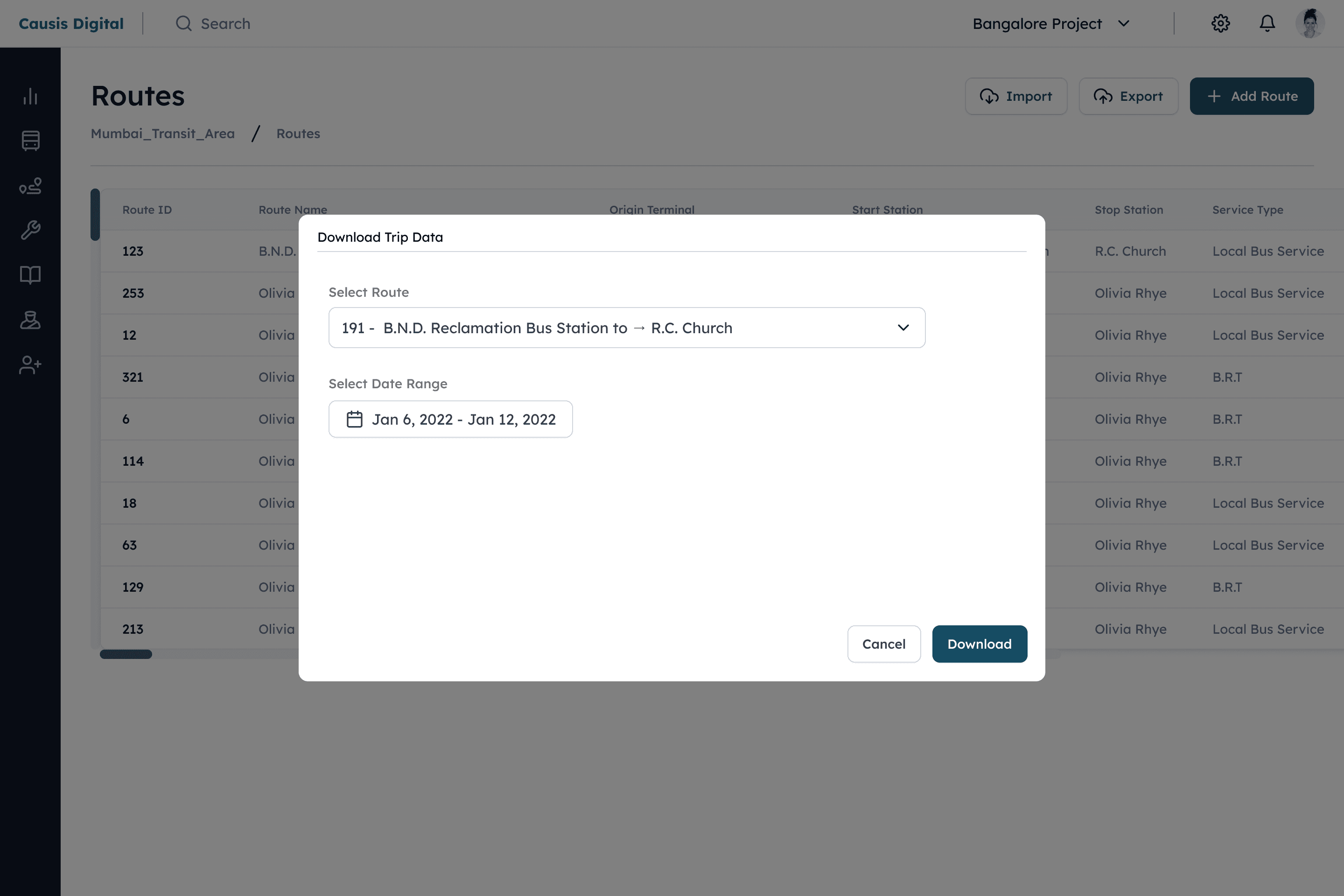
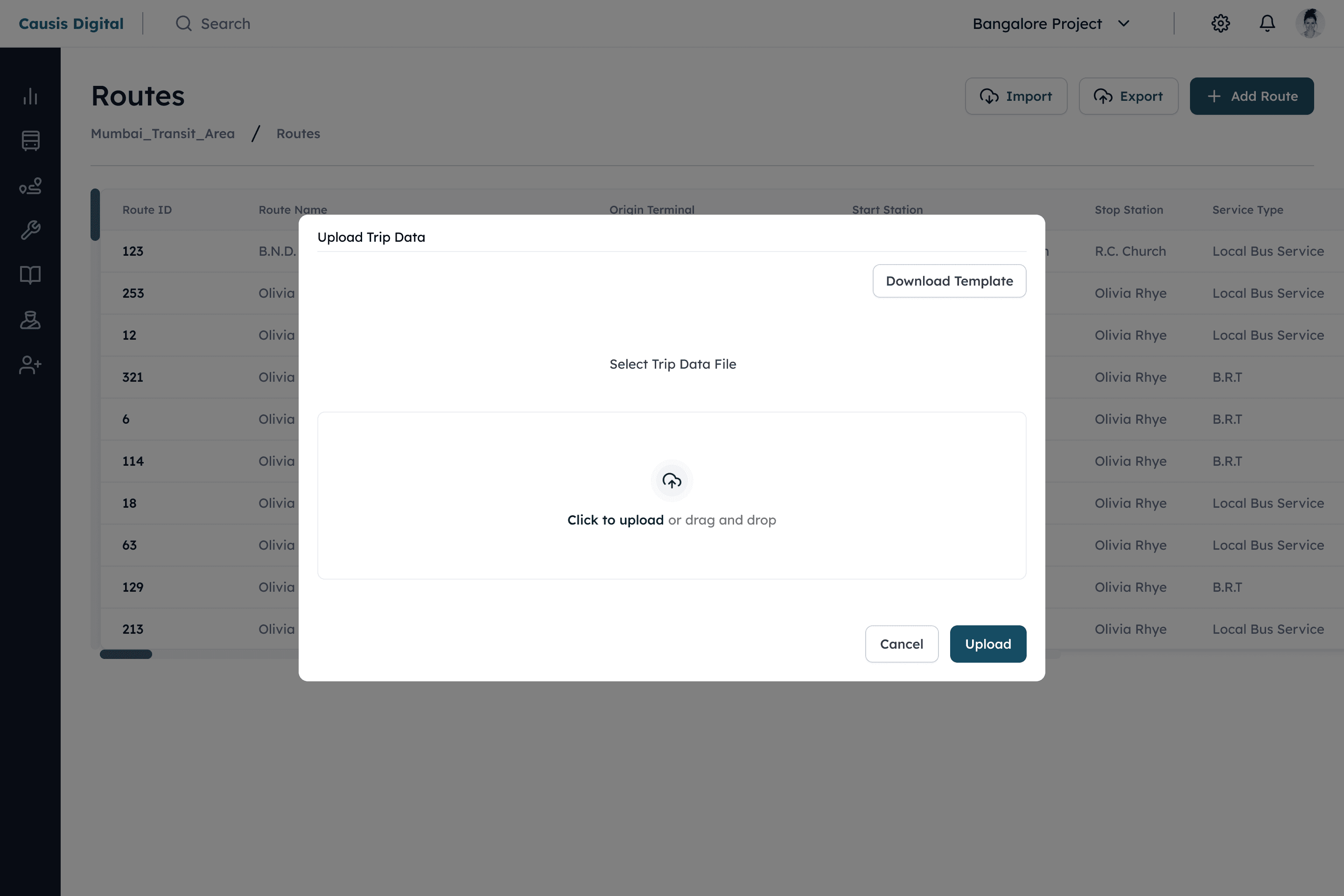
Bulk Data Management
Bulk Data Management
Efficient Bulk Operations: Upload/download entire datasets for routes, trips, drivers, and vehicles in one action
Seamless System Integration: Import complex schedules and rosters from external files directly into the platform
Comprehensive Data Portability: Export operational data from any module for analysis or backup purposes
Flexible File Support: Compatible with various file formats to accommodate existing workflows
Key Benefit: Dramatically reduces administrative overhead by enabling large-scale data handling while maintaining system integrity and flexibility.
Efficient Bulk Operations: Upload/download entire datasets for routes, trips, drivers, and vehicles in one action
Seamless System Integration: Import complex schedules and rosters from external files directly into the platform
Comprehensive Data Portability: Export operational data from any module for analysis or backup purposes
Flexible File Support: Compatible with various file formats to accommodate existing workflows
Key Benefit: Dramatically reduces administrative overhead by enabling large-scale data handling while maintaining system integrity and flexibility.

Training and certifications Flow Design
Training and certifications Flow Design
Goal:
To design an engaging and effective training & certification module within the platform to encourage employees to complete job-related courses.
Goal:
To design an engaging and effective training & certification module within the platform to encourage employees to complete job-related courses.
Target Audience:
All employees within the company, spanning various domains and levels. This encompasses individuals working at different capacities throughout the organization.
Target Audience:
All employees within the company, spanning various domains and levels. This encompasses individuals working at different capacities throughout the organization.
Overview:
I designed the "Training and Certifications" module, which offers educational courses tailored to specific job profiles. Employees can access a variety of courses for different roles and earn certifications upon completion. This system motivates employees to deepen their understanding of their roles and pursue additional courses for job enhancement.
Overview:
I designed the "Training and Certifications" module, which offers educational courses tailored to specific job profiles. Employees can access a variety of courses for different roles and earn certifications upon completion. This system motivates employees to deepen their understanding of their roles and pursue additional courses for job enhancement.
Personality
Friendly
Hard-working
Intelligent
Pain-points
Pain-points
Struggles with work-life balance due to job demands.
Feels stagnant with limited career growth opportunities.
Experiences miscommunication in cross-department collaborations.
Finds the office environment stressful with high-pressure deadlines.
Feels underappreciated and that achievements are not recognized.
Struggles with work-life balance due to job demands.
Feels stagnant with limited career growth opportunities.
Experiences miscommunication in cross-department collaborations.
Finds the office environment stressful with high-pressure deadlines.
Feels underappreciated and that achievements are not recognized.
Motivations
Motivations
Seeks continuous learning and professional development.
Values recognition for hard work and achievements.
Desires to work on impactful projects.
Enjoys autonomy and the freedom to implement creative ideas.
Values collaboration and teamwork.
Seeks continuous learning and professional development.
Values recognition for hard work and achievements.
Desires to work on impactful projects.
Enjoys autonomy and the freedom to implement creative ideas.
Values collaboration and teamwork.
Priya Sharma
Priya Sharma
24, Mumbai
Technician


"I believe that the best job opportunities are gained through experience."
"I believe that the best job opportunities are gained through experience."
Technical proficiency
Technical proficiency
IT & Internet
IT & Internet
Device / mobile
Device / mobile
Social media
Social media
Additional comments
Additional
comments
Priya is a very hard-working individual who is very diligent in her work. She is appreciated by her colleagues for her punctuality and helpful nature.
Priya is a very hard-working individual who is very diligent in her work. She is appreciated by her colleagues for her punctuality and helpful nature.
User Persona
User Persona
Design Elements
Design Elements
Cards
Cards
The goal was to display courses as cards with detailed information. After multiple iterations, I created a card design that effectively represents the different stages of a course. I modularized components for these various scenarios, ensuring consistent and easy implementation across all pages.
The goal was to display courses as cards with detailed information. After multiple iterations, I created a card design that effectively represents the different stages of a course. I modularized components for these various scenarios, ensuring consistent and easy implementation across all pages.
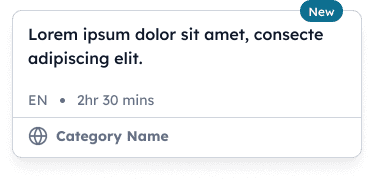
Course pending
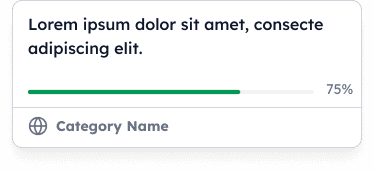
Course in progress

Video in progress

Quiz in progress
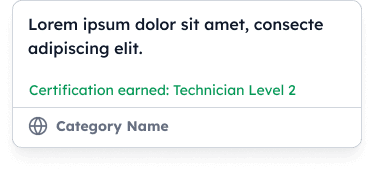
Course completed
Filters and sorting
Filters and sorting
The goal was to display courses as cards with detailed information. After multiple iterations, I created a card design that effectively represents the different stages of a course. I modularized components for these various scenarios, ensuring consistent and easy implementation across all pages.
The goal was to display courses as cards with detailed information. After multiple iterations, I created a card design that effectively represents the different stages of a course. I modularized components for these various scenarios, ensuring consistent and easy implementation across all pages.
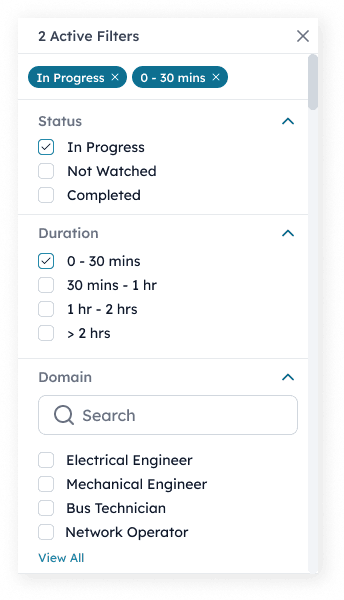
Active filters expanded
Active filters expanded
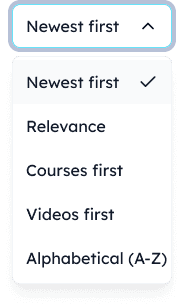
Sorting
Sorting
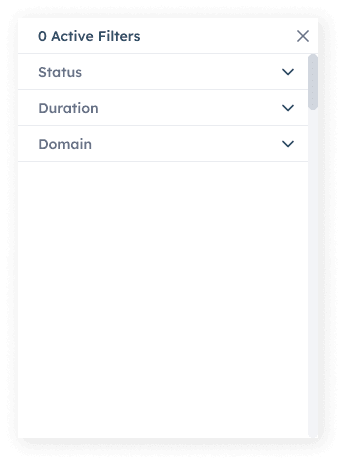
No active filters
No active filters
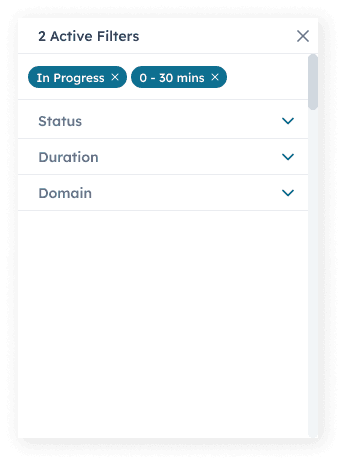
Active filters
Active filters
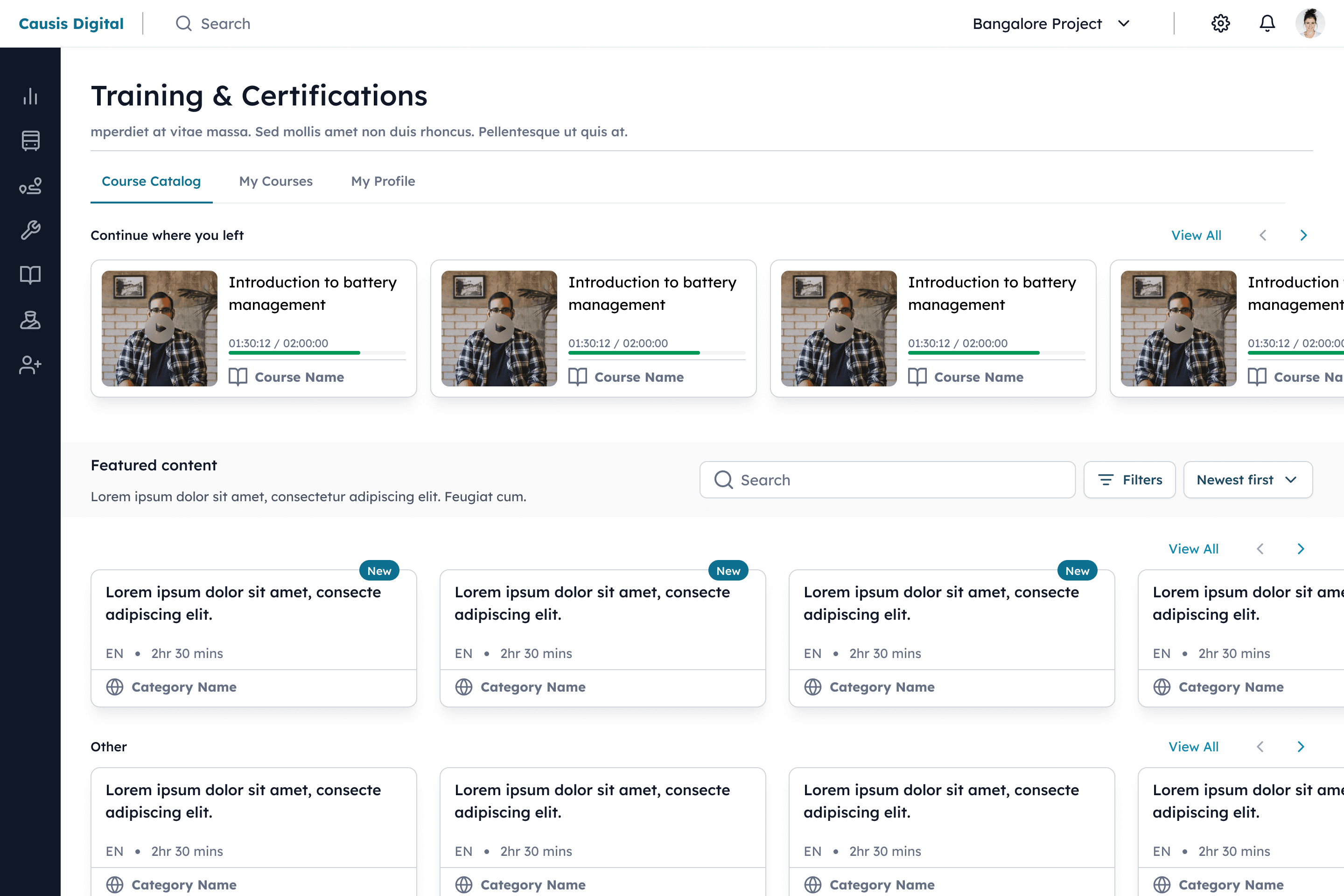
course catalog
course catalog
Three-Tab Navigation - Clear separation between course discovery, personal progress, and profile management
Smart Course Discovery - Search, filter, and sort capabilities in the catalog for efficient content finding
Progress-First Dashboard - "My Courses" prioritizes in-progress content with visual status tracking
Horizontal Scrolling & View All - Flexible browsing options balance quick access with comprehensive overviews
Personalized Learning Profile - Centralized tracking of individual progress and achievement metrics
Key Benefit: Creates a personalized learning experience that adapts to different user preferences while maintaining focus on continuous progress and development.
Three-Tab Navigation - Clear separation between course discovery, personal progress, and profile management
Smart Course Discovery - Search, filter, and sort capabilities in the catalog for efficient content finding
Progress-First Dashboard - "My Courses" prioritizes in-progress content with visual status tracking
Horizontal Scrolling & View All - Flexible browsing options balance quick access with comprehensive overviews
Personalized Learning Profile - Centralized tracking of individual progress and achievement metrics
Key Benefit: Creates a personalized learning experience that adapts to different user preferences while maintaining focus on continuous progress and development.
Course overview & Profile
Course overview & Profile
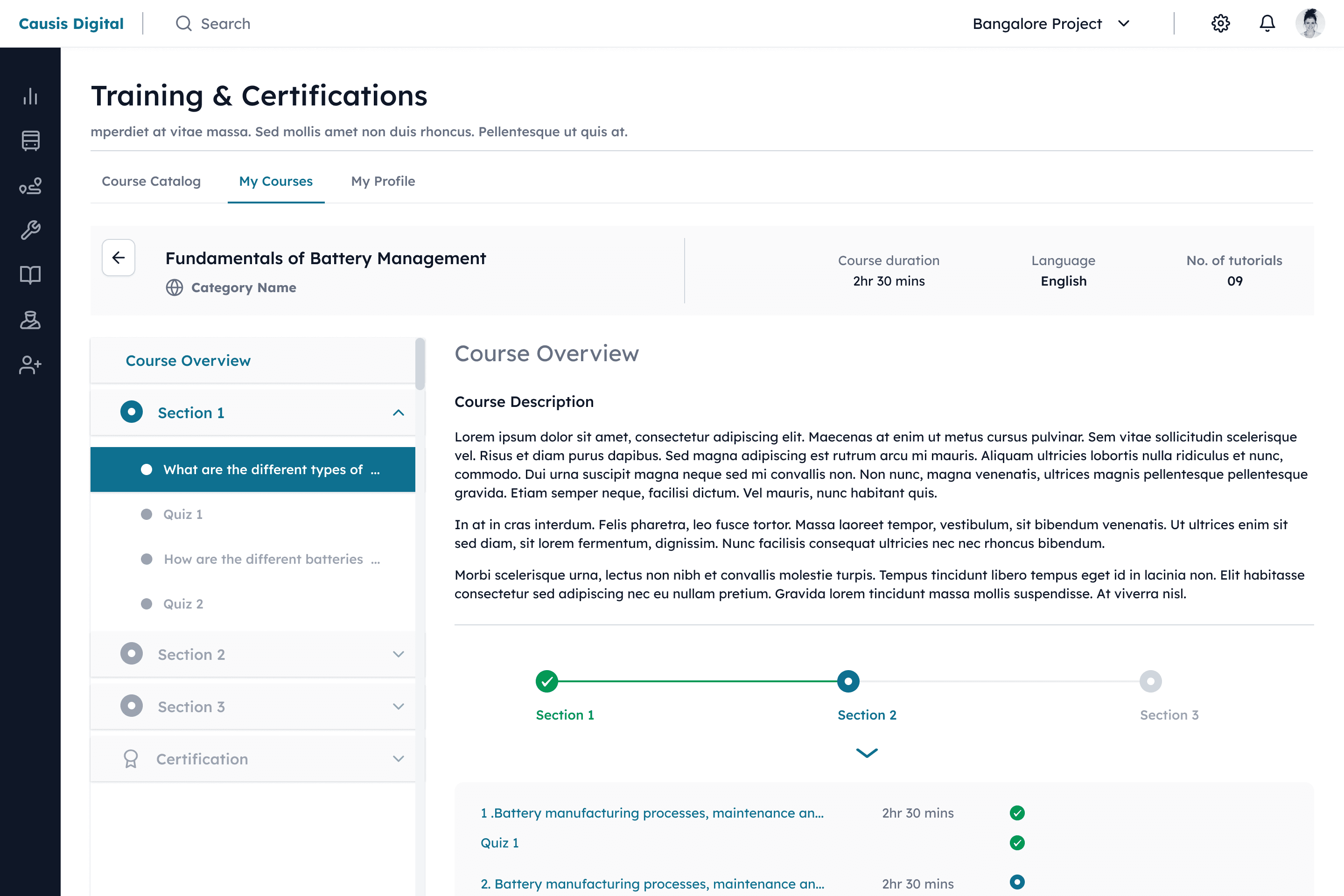
Detailed Course Preview - Clear presentation of overview, objectives, and prerequisites before starting
Progress-Aware Navigation - Sidebar shows completion status and section structure for easy orientation
Multimedia Learning Path - Sequential video tutorials followed by knowledge-check quizzes
Flexible Viewing Options - Full-screen video player and expandable quiz interface for optimal focus
Progress Tracking - Visual certifications progress bar and filtered course status (required/active/pending)
Key Benefit: Creates a structured yet flexible learning environment that balances guided progression with user control, enhancing knowledge retention and certification completion rates.
conclusion
conclusion
Key Findings
Learning Curve: Users quickly learned core functions, with reasonable task completion times.
Efficiency: High task completion rates (85%+) and positive feedback (4/5 rating) showed efficient workflows.
Future Steps
Continuous monitoring, A/B testing, and follow-up surveys will ensure long-term user satisfaction and identify improvement areas.The platform effectively streamlines electric bus fleet operations, offering an intuitive and efficient user experience.
Specific Features
Route & Trip Planning: Highly rated (4.5/5) for ease of use.
Driver & Vehicle Management: Intuitive visual calendar interface.
Training Modules: Engaging and effective, with positive feedback.
Overall Satisfaction: High user satisfaction score (8.3/10) confirmed the platform's effectiveness.